Customer Feedback Loops That Grow Your POD Apparel Brand
You've launched a handful of POD shirts, watched the first orders come in, and started reading every review like it's a verdict on your entire brand. One buyer loves the design, another says the sizing feels unclear, and someone on social media asks whether the print will survive washing. You make a few changes, launch another shirt, and still find yourself guessing.
That cycle doesn't have to stay chaotic. Customer feedback loops turn scattered buyer language into an operating system for sharper designs, clearer listings, better product decisions, and stronger customer relationships. In a Skup-style apparel business, every shirt can teach you something useful, but only if feedback reaches a decision, the decision becomes an action, and buyers can see what changed.
Table of Contents
- The POD Seller Stuck Guessing at Designs
- What Customer Feedback Loops Actually Are
- The Four Channels POD Apparel Brands Should Watch
- How to Build Your Own Feedback Loop Step by Step
- Measuring Whether Your Loop Is Working
- Common Mistakes That Kill Feedback Loops
- Plugging the Loop Into a Skup Workflow
- Your First Action This Week
The POD Seller Stuck Guessing at Designs
A seller I've seen repeatedly follows the same pattern. They launch several shirts for a promising niche, check the star ratings, and tweak whichever design feels weakest. A buyer mentions that the graphic looks smaller than expected. Another praises the message but says the product page didn't make the fit clear. A third asks whether the shirt is soft before ordering.
None of those comments is useless. The problem is that the seller stores them as isolated reactions instead of connecting them to a product decision. The next launch has a new mockup, a different title, and another variation of the same uncertainty. The catalog keeps moving, but the operating knowledge doesn't.
Turn scattered reactions into decisions
A feedback loop gives each signal somewhere to go:
- Collect reviews, post-purchase responses, support tickets, and social comments.
- Organize the input by product, design, niche, and customer journey stage.
- Identify a decision, such as changing the size chart, revising the mockup, or testing a new print choice.
- Act within a defined window instead of leaving the issue in a notes app.
- Check the result through new feedback and buying behavior.
- Tell customers what changed when their input influenced the update.
That last step separates an operating system from a review inbox. A buyer who sees a clearer size guide or a revised product image understands that the brand pays attention. A buyer who leaves feedback and never receives an acknowledgment has no reason to invest effort again.
What guessing costs an apparel store
Ignoring the loop creates familiar problems. You repeat the same design mistake across multiple shirts, write product pages around your own assumptions, and target a broad audience because customer language never gets organized into a sharper niche. Support questions remain individual tickets instead of becoming listing improvements.
The opportunity is much more energizing than the problem. A single useful comment can improve a shirt, then inform a related niche, then strengthen the next design batch. If you're exploring fashion SKU production with AI, pair that faster production process with disciplined buyer feedback. Speed helps you create more options, while the loop helps you decide which options deserve attention.
What Customer Feedback Loops Actually Are
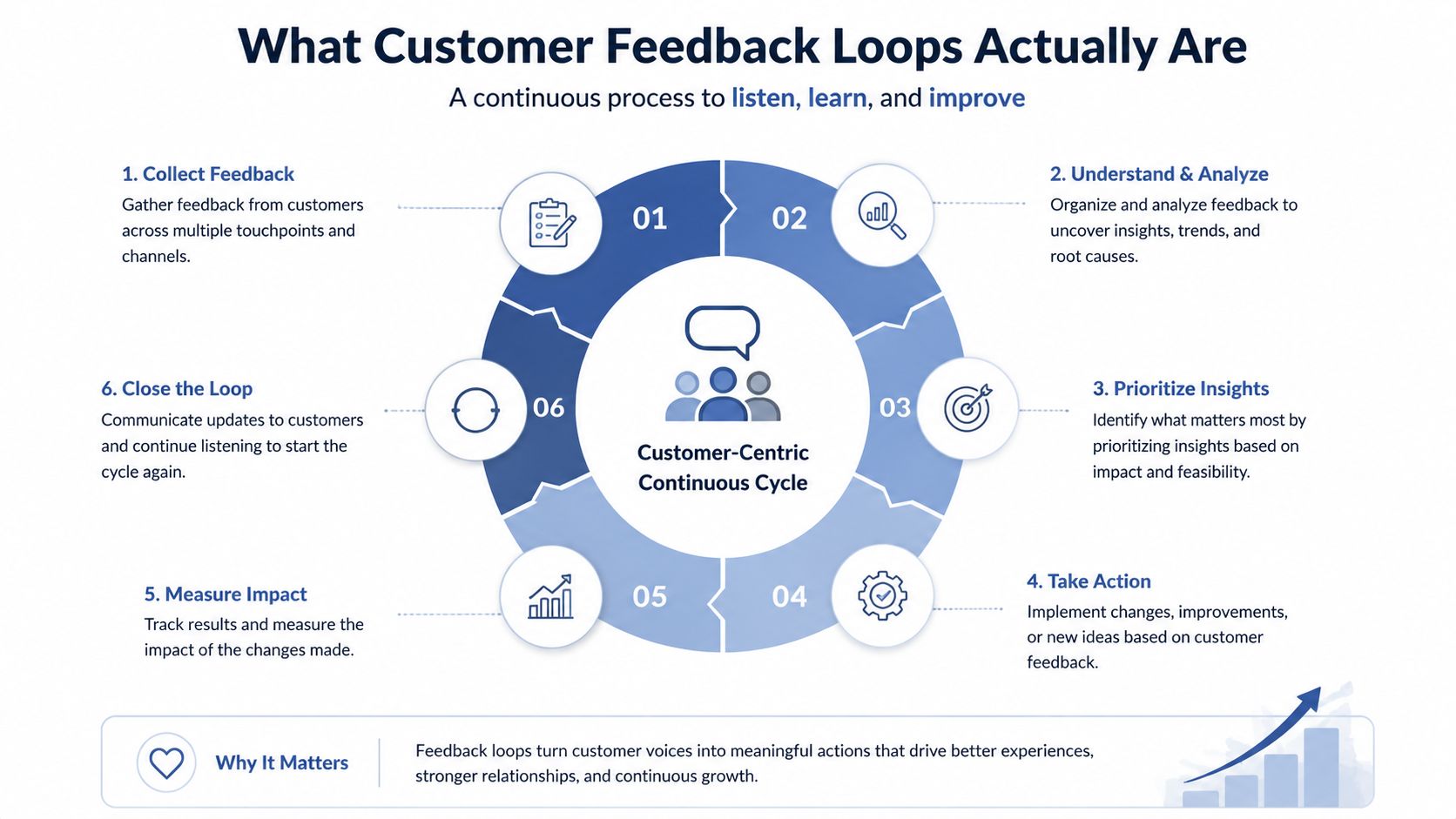
A customer feedback loop is a repeatable system for capturing buyer input, interpreting what it means, acting on a specific decision, and closing the conversation with the customer. The commonly used operational model has four stages, collection, analysis, action, and follow-up. This overview of customer feedback loops uses the same four-stage structure.
Think of a tailor taking measurements. The tailor doesn't ask whether the garment is “good” and then put the measuring tape away. They check the fit, identify where the sleeve or waist needs adjustment, make the alteration, and ask the customer whether the result feels right. Your POD store needs the same discipline.
Map the four stages to a POD store
Collection happens after an order, delivery, support interaction, or public conversation. Ask for input while the experience is still easy for the buyer to recall, but keep the request focused. Customers often won't spend more than 3 minutes filling out a feedback form, according to this customer satisfaction statistics summary, so a short question usually beats a sprawling questionnaire.
Analysis means separating themes that require different fixes. Tag comments as fit, fabric feel, print quality, sizing clarity, delivery experience, packaging, design appeal, or expectation mismatch. “I like the shirt but thought the graphic would be larger” needs a different response from “the package arrived damaged.”
Action turns a theme into a store change. You might revise the product description, add a close-up mockup, clarify garment measurements, adjust the size chart, change a production option, or update the post-purchase message. Use a practical framework to collect and analyze feedback without allowing every individual opinion to dictate the catalog.
Follow-up proves the loop is alive. Reply to the reviewer, notify affected buyers, update the product page, or mention the improvement in the next campaign. A form that collects responses but never produces a decision is only an intake channel. A documented change gives your store learning it can reuse.
The Four Channels POD Apparel Brands Should Watch
A single feedback source leaves blind spots. Reviews show public product experience, surveys impose structure, support tickets expose urgent friction, and social listening captures the language buyers use when they are not completing a feedback form. Route all four into the same decision process, then connect each recurring signal to a product, listing, or campaign change.
| Channel | Best For | Effort | When to Review | Best POD Questions |
|---|---|---|---|---|
| Product reviews | Product-specific experience and purchase confidence | Low to moderate | After delivery and before new design decisions | Did the fit, fabric, print, and design match expectations? |
| Post-purchase surveys | Focused questions tied to a decision | Moderate | After delivery, using a limited sample | What almost stopped you from ordering? |
| Customer support tickets | Urgent problems and expectation gaps | Moderate | As tickets arrive, with a weekly theme review | Was sizing, shipping, print quality, or delivery clear? |
| Social listening | Unprompted language and emerging reactions | Moderate to high | Weekly | What words do buyers use for the niche, design, and objections? |
Reviews show the product in context
Reviews carry strong product intent because buyers leave them after handling and wearing the item. Ask for details beyond a star rating. Fit, fabric feel, print durability, design accuracy, and the gap between the shirt and its listing help connect a reaction to a specific fix.
Reviews also supply copy language. Positive comments can reveal phrases worth testing in product titles, descriptions, or ads. Negative comments can expose a product-page gap before the same misunderstanding reaches more orders. Feed useful customer wording into a user-generated content strategy for POD brands when the buyer's permission and context support it.
Surveys add structure
A post-purchase survey works best when it answers one question tied to a decision. “What almost stopped you from ordering?” can reveal uncertainty around sizing, price, design relevance, shipping, or trust. A focused prompt produces cleaner input than asking customers to evaluate every part of the experience at once.
Response rates can be limited, so treat survey answers as one signal rather than the verdict on a shirt. Compare them with review language and the behavior that follows the order. A survey may identify hesitation, while support conversations explain exactly which measurement, mockup, or promise created it.
Support and social reveal friction
Support tickets need a route to the person who can change the store. Repeated measurement questions belong in the listing. Repeated shipping questions may require clearer delivery language or a better post-purchase message. Tag each ticket by product and theme, then review the grouped patterns instead of reacting to isolated requests.
Social listening covers comments, direct messages, Reddit discussions, TikTok, and Instagram. It can reveal niche vocabulary, design objections, and reactions buyers would never place in a form. Do not chase every reaction. Save recurring phrases, connect them to the relevant shirt or listing, and compare them with reviews and tickets.
Customers do not always complain directly. Combining channels helps surface quiet dissatisfaction and shows whether a change improves the full buyer experience. In a closed POD loop, collection is only the intake. The useful output is a documented decision that sharpens the next design, listing, or customer message.
How to Build Your Own Feedback Loop Step by Step
Start with one product, not your whole catalog. Choose a shirt that has enough customer interaction to teach you something, then write one question tied to a real decision, such as whether to keep, adjust, or retire the design within 14 days.
Pick two channels from the previous section. Reviews plus support tickets often work well for a small store because both connect directly to the product experience. Capture the buyer's exact language wherever possible. A summary like “sizing issue” is less useful than the original wording that explains what the buyer expected and what they found.
Create a weekly decision rhythm
Use a simple three-bucket triage:
- Keep: The evidence supports the current design, listing, or product choice. Record why.
- Iterate: A recurring issue points to a fix you can test. Name the change and owner.
- Kill: The product doesn't justify more attention based on the available evidence. Record the reason instead of abandoning it.
This keeps you from treating every comment as an emergency. One unusual opinion may be useful, but a repeated pattern across reviews, tickets, and social conversations deserves a defined response.
Act while the signal is useful
Choose the strongest signal and make one visible update within 7 days. Change the main listing image if buyers misunderstand the graphic scale. Rewrite the title if the niche language feels too broad. Add garment measurements if support questions repeatedly focus on sizing. Update the production note when the buyer expectation and the physical product don't match.
Your action should be small enough to complete and specific enough to evaluate. Don't change the design, mockups, title, and product choice simultaneously unless the evidence points to a broader mismatch.
For a practical framework on validating creative choices, use this step-by-step guide to testing print-on-demand designs. The loop becomes valuable when each test leaves a record.
Close the conversation
Reply to reviewers with a specific acknowledgment. If a change ships, email past buyers who raised the issue when that's appropriate. Add a short note to the product page or release communication explaining the improvement without overstating what it solves.
Keep the record in a basic table with columns for date, product, verbatim feedback, theme, decision, action, owner, and outcome. That table becomes a growing source of insight across shirts, niches, and seasons.
Measuring Whether Your Loop Is Working
A busy feedback inbox can hide a stalled system. Measure whether buyer input reaches the right product or listing decision, then verify that the change improves the experience for a specific shirt, niche, or design.
Track loop closure rate, the share of respondents who receive a documented reply, follow-up, or resolution. One benchmark framework connects closure with action and resolution, using targets of 85% or more for detractors, 60% or more for passives, and 70% or more for promoters. See the NPS feedback loop closure benchmarks for that framework.
Track time to action from feedback arrival to the store change going live. Track retention lift by comparing repeat purchases among buyers who received a follow-up with matched buyers who did not. Conversion helps confirm a decision, but a single POD design can rise or fall for reasons unrelated to feedback.
KPI snapshot for an active store
| Metric | What It Measures | Healthy Benchmark | Warning Sign |
|---|---|---|---|
| Loop closure rate | Whether feedback receives a response, action, and resolution | 85%+ detractor coverage, 60%+ passive coverage, 70%+ promoter coverage | Feedback is logged but not routed |
| Time to action | Days from input to a visible product or listing change | Detractors contacted within 24 to 48 hours, based on this feedback response guideline | Buyers wait while the same issue repeats |
| Retention lift | Repeat purchase behavior after follow-up | Compare your own matched buyer groups | No follow-up group performs differently |
| Theme resolution | Whether recurring complaints decline after a fix | Review themes over time | The same complaint keeps returning |
A separate benchmark reports that closing the loop within 48 hours increases retention by 12% and lifts NPS by an average of 6 points. Validate that relationship against your audience and product mix, as advised in CustomerGauge's close-the-loop guidance.
Use these customer satisfaction metrics to define the measurements your store can maintain. For broader ideas, the practical 2026 metrics guide can expand your view beyond ratings. Compare monthly results with the best and worst-selling designs, and trust decisions supported by several signals rather than a lucky sales spike.
Common Mistakes That Kill Feedback Loops
The fastest way to weaken a loop is to treat reviews as a scoreboard. A high rating feels good, but it doesn't tell you whether buyers understood the sizing, loved the fabric, or bought because the design matched a specific identity. Read reviews as raw material for product decisions.
Chasing every comment creates the opposite problem. Trolls, one-off complaints, and vague reactions can consume an operator's attention while recurring issues wait. Tag the signal, look for patterns, and reserve major changes for evidence connected to a decision.
The habits that drain momentum
- Collecting without replying: Buyers notice when their effort disappears into an inbox. A short, specific response keeps the relationship active.
- Over-surveying: Too many requests train customers to ignore future messages. Keep feedback requests under once per order and once per quarter per buyer.
- Hiding negative product signals: Complaints about sizing, fabric, or print quality often reveal the clearest opportunity to improve expectations and protect margin.
- Building separate data silos: If design, advertising, and support never see the same themes, no one owns the product decision.
- Changing everything at once: Multiple simultaneous edits make it difficult to know which action improved the experience.
The better response to each mistake is operational. Reduce the number of channels if input becomes noisy, assign themes to a person who can act, and publish a simple decision record. Recent guidance recommends limiting programs to 2 to 3 channels to reduce survey overload, as discussed in this Forrester feedback management summary. More listening points don't automatically create better insight.
Plugging the Loop Into a Skup Workflow
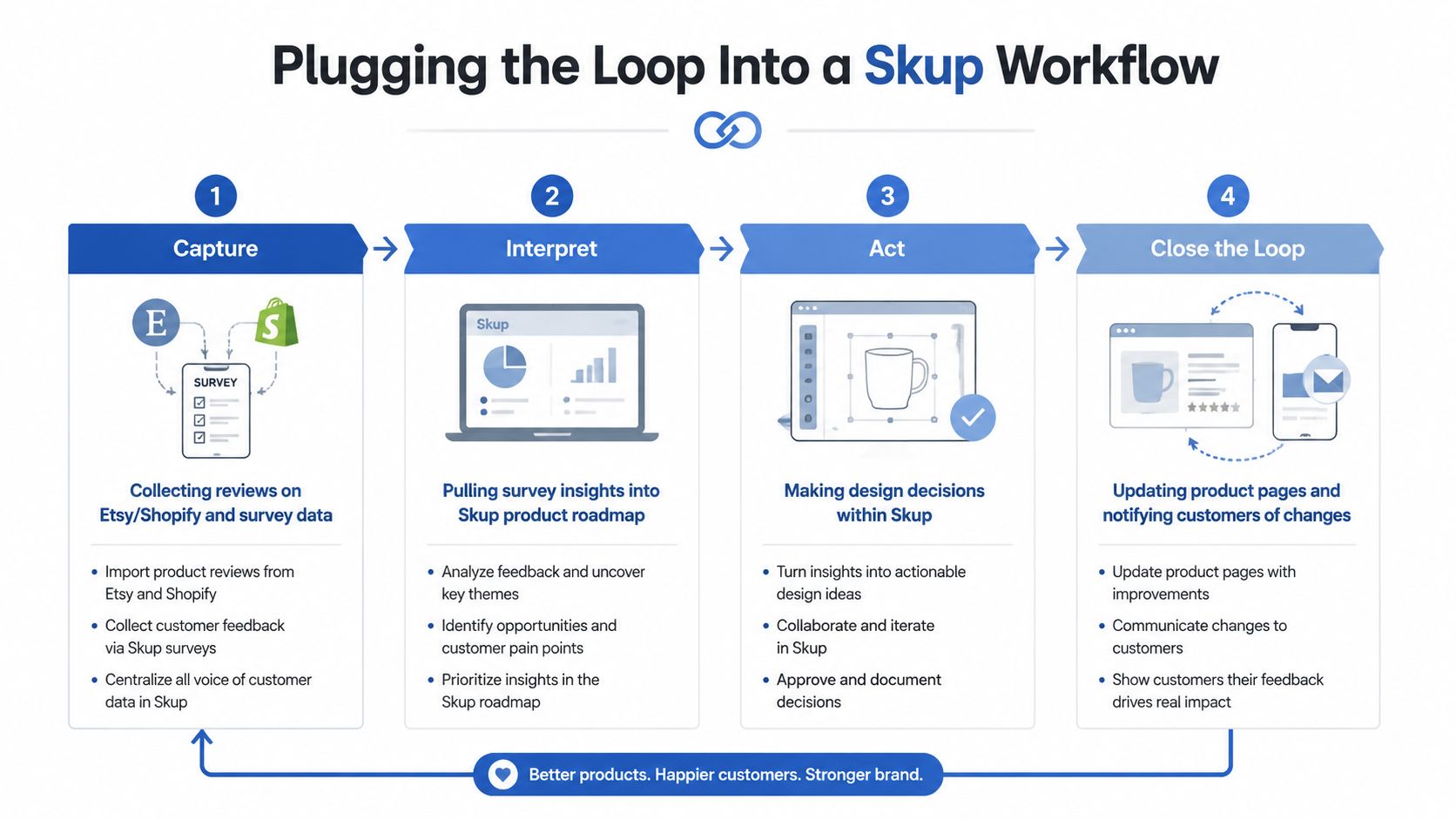
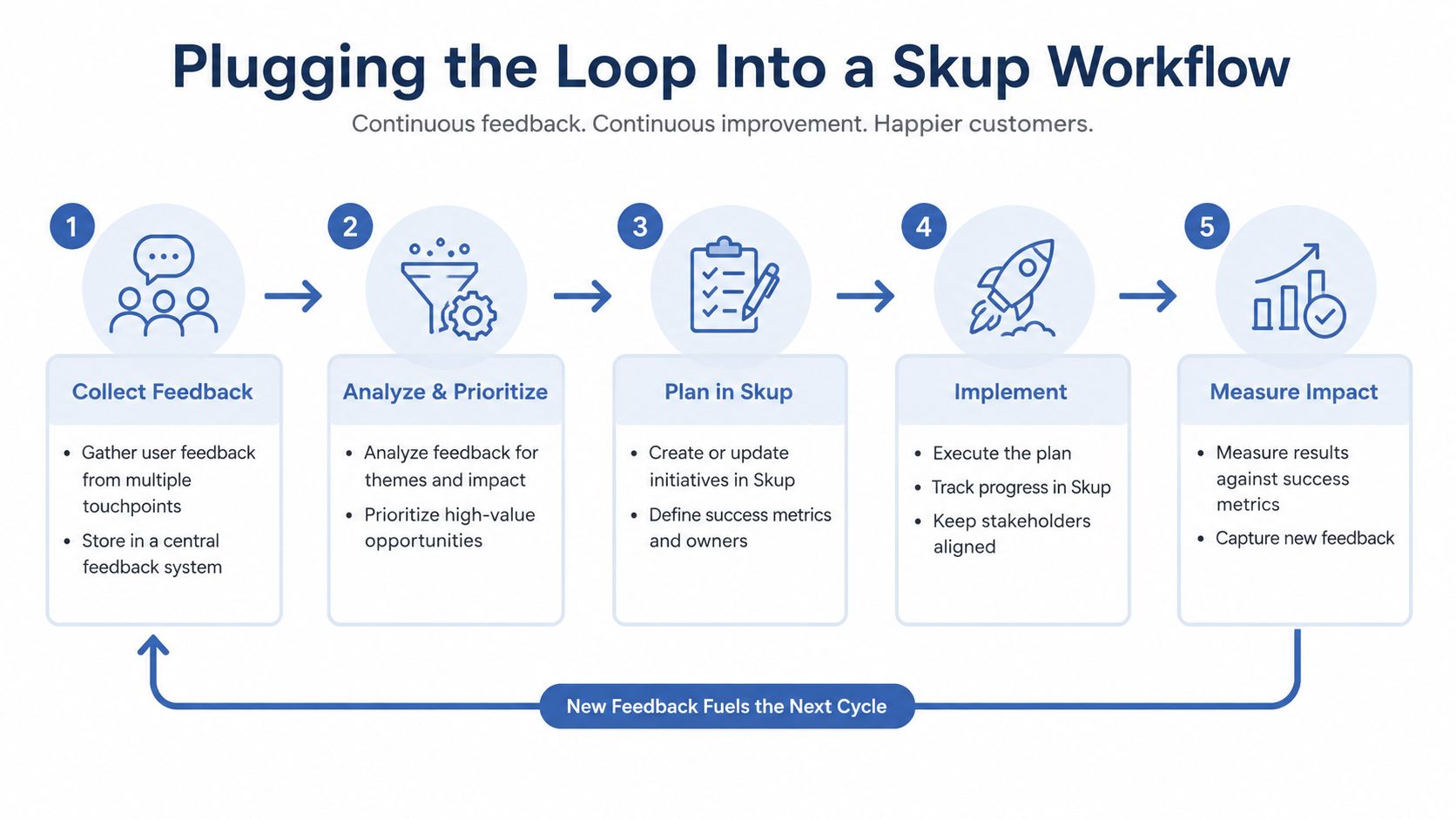
A useful loop should sit inside the design-to-listing rhythm, not beside it. Collect reviews from Etsy and Shopify, bring survey responses into one working sheet, and tag buyer language by product, niche, design angle, and objection.
Route language into creative decisions
AvatarIQ can support the visual side of the workflow by helping generate apparel designs and product mockups faster. The important discipline is deciding what the tool should produce from customer evidence. If buyers respond to a specific phrase, audience identity, or visual treatment, those themes can guide the next creative prompt and listing presentation.
That makes the workflow more deliberate:
- Capture buyer language from reviews, surveys, tickets, and social conversations.
- Interpret recurring themes and group them into niche clusters.
- Act by changing the design, listing copy, mockups, size information, or product choice.
- Publish the update and route the decision to the next campaign or design batch.
- Close the loop by telling affected customers what changed and checking the next responses.
Apparel Cloning frames the larger commercial system. A winning piece isn't just a single shirt to celebrate. It becomes a starting template for exploring related niches, messages, and design directions while preserving what buyers already showed you they value. Feedback tells you which element deserves to carry forward and which part needs a rethink.
Keep the operating rhythm visible
Use one board or sheet for open feedback, decisions in progress, shipped changes, and follow-up. A recurring weekly review prevents support comments from getting trapped in support and keeps creative work connected to customer experience.
Skup's ecosystem includes education, software, and coaching around POD apparel operations. In this workflow, AvatarIQ fits the design and mockup stage, while Apparel Cloning provides the broader method for turning proven product signals into new niche opportunities. The loop supplies the evidence that keeps both activities grounded in buyer behavior.
Your First Action This Week
Pull the last 30 orders from one product or a closely related group. Write one sentence for each buyer based on what they said about fit, fabric, or design. If a buyer didn't leave written feedback, record the most relevant available signal without pretending you know more than you do.
Tag every sentence into three buckets:
- Drop: The product or angle creates a repeated problem you don't want to carry forward.
- Adjust: A listing, mockup, size explanation, or design detail needs a focused test.
- Double down: Buyers respond clearly to the niche, message, visual treatment, or product experience.
Then choose one “adjust” item and put a date beside the action. Update the listing, reply to the relevant customers, and record what you expect to learn. You don't need new software to begin. You need one honest sheet that turns attention into a decision.
That sheet can become the seed for future AvatarIQ prompts and Apparel Cloning templates. Each cycle gives you a sharper view of what your buyers recognize, question, wear, and want next. POD remains an exciting opportunity because the store can keep learning without requiring you to guess from scratch every time.
Skup gives POD apparel sellers a connected path from product education and Apparel Cloning to practical design and mockup workflows through AvatarIQ. Visit Skup to explore how you can turn buyer feedback into clearer decisions, stronger listings, and the next batch of products.