AI Clothing Design: The Complete POD Guide for 2026
AI clothing design is no longer mainly about producing attractive concepts. The surprising shift is that the commercial opportunity is growing faster than the production workflow has matured. One market forecast values the global AI fashion design market at $4.2 billion in 2025 and projects $17.8 billion by 2034, implying a 17.8% CAGR, according to Marketintelo's AI fashion design market analysis. The opportunity is real, but the sellers who benefit won't be the ones generating the most random graphics. They'll be the ones turning good ideas into clean, consistent, mockup-ready products.
For a beginner, that changes the question. You don't need to compete with a large design department before you can test a niche. You need a repeatable system for selecting an audience, developing a visual direction, checking production quality, and presenting the finished garment professionally. Print on demand gives you a flexible way to test those ideas without treating every concept as an inventory bet.
Table of Contents
- Why AI Clothing Design Changes Everything for POD Entrepreneurs
- What AI Clothing Design Means for Your Store
- The Benefits of AI Design for Print on Demand Brands
- Your Step-by-Step AI Clothing Design Workflow
- Legal and Ethical Considerations You Cannot Ignore
- Real Outcomes From Beginners Using AI Design
- Your Next Steps to Launch With AI Clothing Design
Why AI Clothing Design Changes Everything for POD Entrepreneurs
AI clothing design changes the economics of early product testing. A new POD seller can move from niche research to a first product direction without waiting through a long chain of briefs, concept rounds, photography, and listing preparation. The time saved belongs in review and refinement, because raw AI output still needs commercial judgment before it becomes a product.
The market is expanding across fashion and apparel. Apparel represents $0.22 billion in 2025, or 40.7% of the broader AI fashion market, according to the AI in fashion market figures. That share makes clothing a practical area for experimentation, not a minor use case.
The laptop advantage
A beginner with a laptop can test typography, illustration styles, garment colors, and audience-specific messaging in one working session. The useful advantage is iteration speed. AI can produce several creative routes, but the seller still has to reject weak concepts, correct lettering, remove unusable backgrounds, and prepare files that print cleanly.
The production gap is where many beginners lose time. A visually interesting generation may fail on a shirt because fine details disappear, contrast is weak, or the composition does not suit the print area. The asset only becomes valuable after cleanup, transparent-background preparation, sizing for the chosen POD provider, and placement on a realistic mockup. A polished listing then needs product images and copy that match the buyer and garment.
Industry reporting attributes 40% of new clothing designs for some brands to AI algorithms and states that AI can accelerate the design cycle by 60%. It also reports an 80% accuracy rate for AI-driven trend forecasting in predicting six-month sales performance, based on World Metrics' clothing industry statistics. Treat these figures as directional rather than a substitute for testing. Your store still needs actual marketplace response, not just a promising prediction.
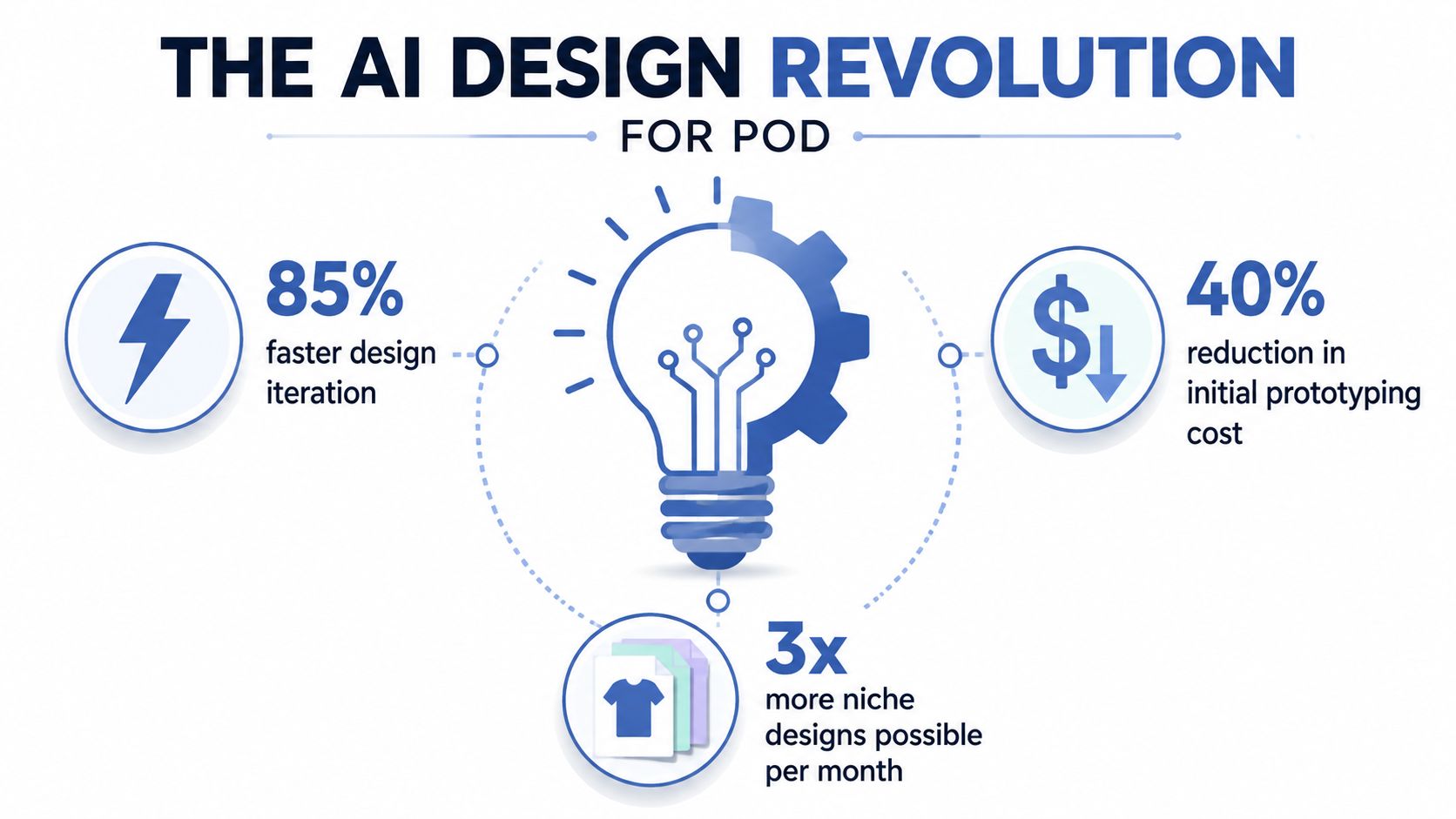
The practical opportunity is test faster, curate harder, and build around a recognizable buyer. Generate broadly, then keep only concepts that communicate the niche, survive production checks, and look credible in real mockups. For broader context, Skup's print-on-demand trends coverage shows why faster experimentation matters as POD continues to develop. AI gives solo sellers access to a faster design layer, while production discipline turns that access into sellable apparel.
What AI Clothing Design Means for Your Store
AI clothing design is a production workflow, not a prompt followed by an image download. For a POD store, it connects concept development, refinement, garment placement, mockups, and listing presentation. The target is a sellable, platform-ready asset that looks credible on an actual product page.
A general image generator may produce an appealing picture while leaving distorted lettering, weak edges, inconsistent anatomy, an unusable background, or details that vanish in print. Review each output against practical questions. Does the artwork communicate the niche immediately? Will its main elements remain legible on the chosen garment color? Can you place it cleanly on the chest, back, sleeve, or another intended area?
Three levels of usefulness
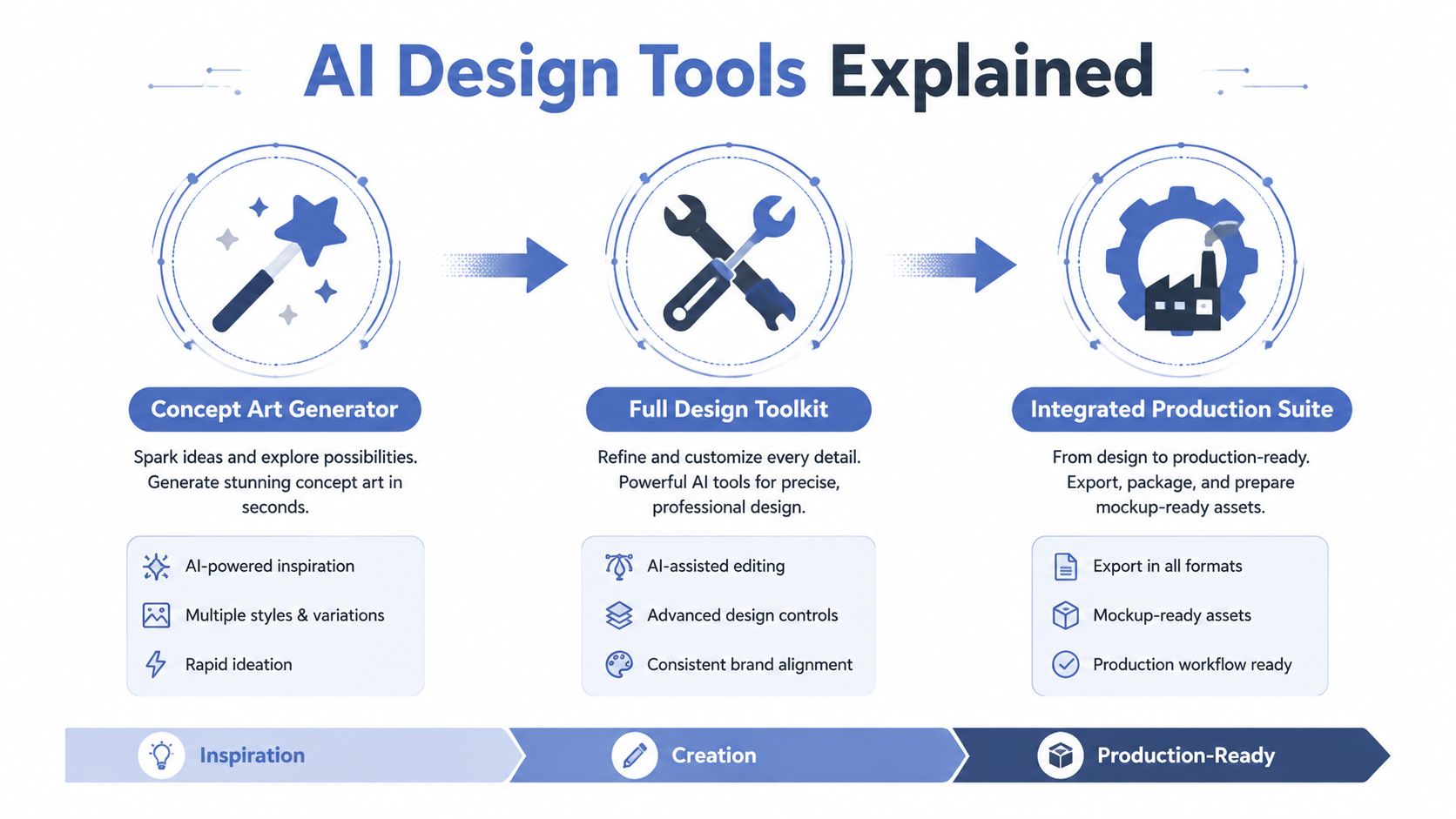
AI design systems generally fall into three levels:
- Concept art generator: useful for mood, visual exploration, and rough directions. It creates inspiration, not necessarily a sellable file.
- Design toolkit: supports variations, typography exploration, cleanup, composition, and consistent visual development.
- Integrated production suite: connects design decisions to garment presentation, mockups, and listing assets.
Beautiful isn't the same as printable. MIT researchers have proposed a generative AI textile workflow combining historical pattern collections, mathematical modeling, mechanical characterization, computer-vision deep learning, and lacemaking knowledge. The proposed system addresses attribute-specific pattern generation, process-specific instruction encoding, and eventual physical fabrication, as described in the MIT textile design research pipeline. POD products are simpler, but the same principle applies: useful apparel AI must account for materials and production constraints.
For dimensional product visuals, 3D asset creation with Sculpty helps clarify the difference between a flat concept and a more complete digital asset. That distinction matters when building mockups or checking how artwork should appear in a product environment.
What still belongs to you
AI can generate options, but it cannot understand your customer as well as you can. You choose whether a phrase sounds natural, whether a joke feels overused, whether the visual fits the niche, and whether the product deserves a listing.
A 2025 empirical study interviewed 10 fashion industry professionals about generative AI for textile design. Practitioners were evaluating it for faster concept development while also reporting adoption barriers, as documented in the Taylor & Francis textile design study. The useful takeaway for POD operators is straightforward. AI works best as a fast creative partner within human review, with cleanup, production checks, mockup testing, and final merchandising still handled deliberately.
The Benefits of AI Design for Print on Demand Brands
AI design improves POD decision-making before you commit time to production, listing creation, and promotion. Its strongest use is not producing a finished shirt from one prompt. It is helping you compare several directions, identify the strongest concept, then turn that concept into a clean, sellable asset.
Build a small collection around one audience instead of judging a niche from one isolated design. Compare typography, illustration style, color treatment, and garment placement together. More useful iterations create more opportunities for product-market feedback, provided you reject weak or generic outputs quickly.
Faster iteration creates better judgment
Early design choices are uncertain, even when you understand the audience. A niche may respond better to bold type than hand-drawn art, or to retro graphics rather than restrained minimalism. AI lets you test those directions quickly, then commit to a coherent visual lane instead of filling a store with unrelated experiments.
The market is expanding, which gives POD operators a practical reason to learn the workflow now. Forecasts estimate the global generative AI in fashion market could grow from USD 176.9 million in 2025 to about USD 4,090.8 million by 2035, with a 36.9% CAGR. Another forecast estimates growth from USD 96.5 million in 2023 to USD 2,230.4 million by 2032, also at 36.9% CAGR, according to Market.us's generative AI fashion market forecast. The forecasts cover different scopes, but both point to rapid expansion.
More testing without adding fixed creative overhead
AI lowers the cost of exploring niche angles before you pay for extensive refinement. A beginner can test several rough concepts without hiring a designer for every direction. That does not make every output ready for sale. It lets you reserve cleanup, vector work, typography correction, and production checks for ideas with clear audience fit.
Mockups benefit from the same approach. You can test how a graphic reads on a shirt, hoodie, or lifestyle image before arranging a physical shoot. AvatarIQ supports generated apparel visuals and product photoshoots, so sellers can evaluate presentation while focusing on product selection and merchandising.
For visual reference beyond a generated graphic, Wear X Apparel custom merchandise reinforces the production point: customers experience a complete product, not a standalone AI image.

Generic output is the new baseline
AI may increase the number of interchangeable designs in the marketplace. The response is stronger specific niche insight, original editing, consistent collections, and better product presentation.
A disciplined store rejects acceptable-but-forgettable outputs, repairs awkward text, removes clutter, verifies print suitability, and builds product families that feel intentional. Raw generation is only the midpoint. The sellable asset needs clean artwork, a credible mockup, and a listing that communicates why the buyer should care.
Commercial rule: AI gives you more shots at a strong concept. Your curation determines whether those shots become a brand.
Your Step-by-Step AI Clothing Design Workflow
AI can produce a marketable clothing concept quickly, but the raw output is rarely a production-ready POD asset. The reliable process separates idea generation from file cleanup, garment testing, mockup creation, and listing preparation.
1. Start with a narrow buyer
Choose an audience with a clear identity, recurring interests, and recognizable language. “People who like animals” is broad. A specific occupation, hobby, lifestyle, or community gives the design a sharper commercial direction.
Write down where that buyer might wear the garment, what tone suits them, and why the design would earn a place in their wardrobe. This brief keeps the prompt tied to a product rather than a random visual theme.
2. Turn the brief into a visual prompt
A useful prompt names the subject, style, typography, composition, garment placement, color direction, and production intention. For example:
- Vintage graphic: “Vintage screen-print-inspired illustration of a determined mountain climber, distressed ink texture, limited earthy palette, bold arched typography, centered chest composition, strong silhouette, no background.”
- Minimal typography: “Minimalist typography design for a quiet morning coffee niche, refined serif lettering, balanced spacing, one small line-art accent, high contrast, centered chest placement, clean transparent background.”
- Niche illustration: “Playful illustrated design for backyard gardeners, happy tomato plant character, hand-drawn details, friendly humor, clear central subject, readable short phrase, balanced composition for a front garment print.”
Keep the prompt focused. Conflicting style instructions often create crowded artwork with weak hierarchy and no clear buyer.
3. Generate variations, then choose a production candidate
Create several related directions, then select the one with the strongest combination of audience fit, readable messaging, and workable composition. At this stage, judge the file as an asset you must prepare, not as a finished product.
Inspect lettering character by character. Generative tools commonly produce misspelled words, inconsistent letterforms, or decorative details that disappear at print size. Rebuild text in a design editor when necessary instead of trusting the model's typography.
The key judgment is whether the output can move efficiently into production. Research on generative AI and textile design practice describes the value of faster concept development alongside the need to fit generated work into established design processes. For POD sellers, that means selecting ideas that can be edited, exported, printed, and presented consistently.
4. Check production readiness
Clean the chosen artwork before creating a listing. Remove artifacts, repair text, simplify muddy color transitions, and delete background elements that do not support the design. Check the graphic on the intended garment color and within the actual print area, not only on a white artboard.
For most POD artwork, export a transparent PNG at the print provider's recommended dimensions and inspect it at full size before uploading. Keep an editable working file separately so you can revise colors, text, or placement without regenerating the entire concept. A simpler design with strong contrast usually survives production better than a detailed image with fragile edges.
If the output needs major reconstruction, use it as a reference and rebuild the concept. Do not force an unstable file into a product catalog.
5. Build the mockup around the buyer
Use AvatarIQ to place the selected design into product visuals and lifestyle scenes. Match the setting to the audience and garment. An active hobby shirt may suit an outdoor scene, while a minimalist product needs a clean, close view that shows fabric, placement, and silhouette.
Create a primary image that communicates the garment immediately, then add supporting views for placement, detail, color options, and context. Compare the mockup with the print file. A design that looks balanced on a flat canvas may appear oversized, too low, or difficult to read once placed on a model.
For additional workflow options, review Skup's guide to the best AI design tools. Write the listing from the finished product, including the garment, audience, fit expectations, and design theme. The sellable offer is the combination of artwork, garment, mockup, title, description, and buyer expectation.
Legal and Ethical Considerations You Cannot Ignore
The assumption that an AI-generated design is automatically safe to sell is wrong. The United States treats copyright and trademark as separate questions, and sellers need to evaluate both before publishing apparel.
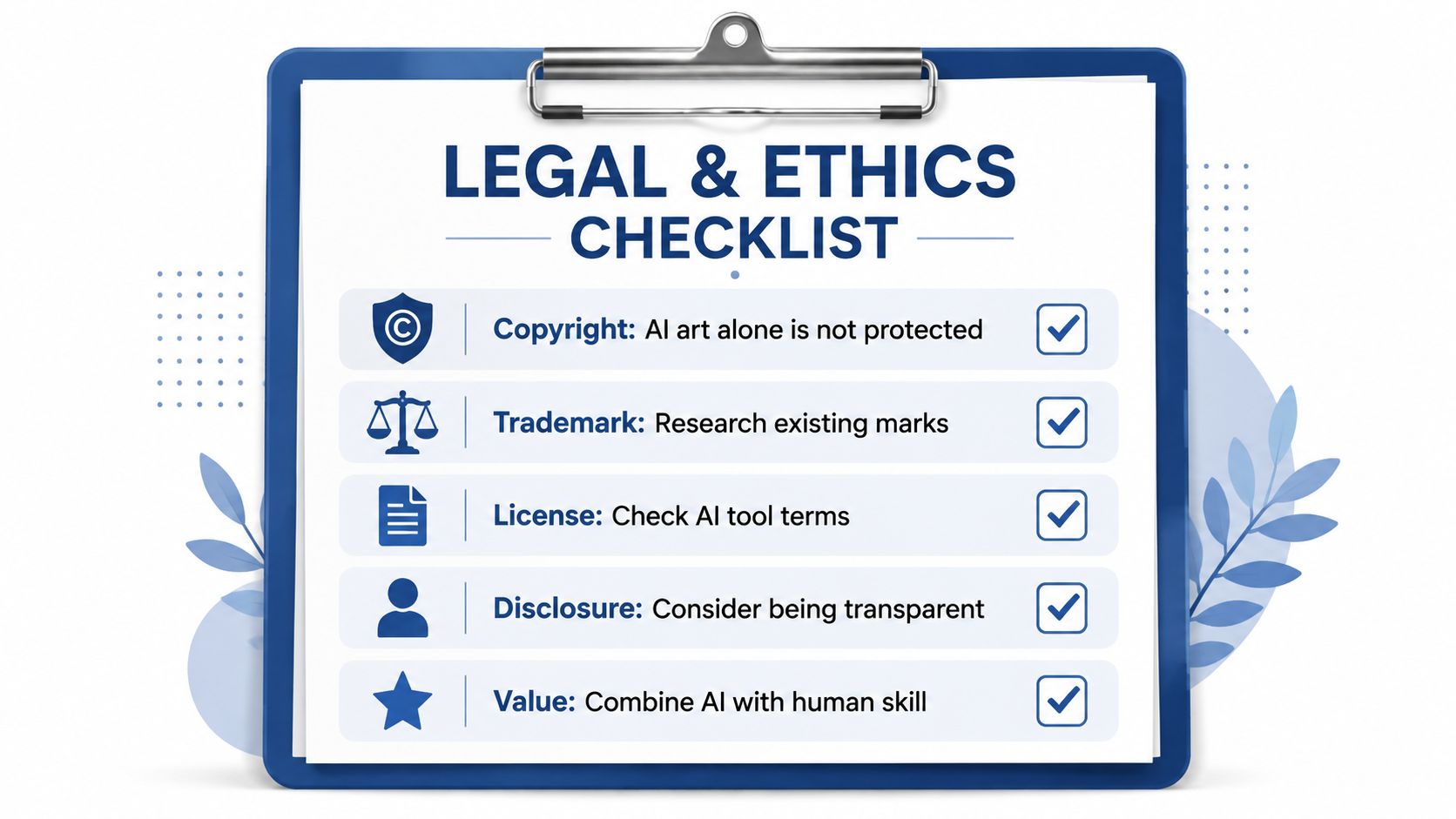
The U.S. Copyright Office's position is especially important for AI clothing design. The shape, cut, and dimensions of a garment generally aren't protected as clothing design, while separable two-dimensional surface artwork may qualify if it is original. At the same time, the Copyright Office says a work must be created by a human being, so purely machine-generated fashion artwork isn't registrable, as summarized in fashion copyright guidance from Lutzker.
Human contribution changes the analysis
Purely AI-generated artwork can be commercially usable while still lacking copyright protection for the machine-generated portion. AI-assisted work may qualify when a person contributes meaningful creative expression, such as selecting and arranging elements, substantially editing the composition, rewriting the text, or combining original human-created components.
The U.S. Copyright Office's AI guidance was reaffirmed in 2025. Purely AI-generated designs are ineligible for copyright, while AI-assisted works can qualify when the applicant identifies meaningful human contributions and discloses where generative tools were used, according to Style3D's summary of the copyright boundaries.
Keep a simple process record:
- Save the brief: Record the original niche idea and creative direction.
- Keep versions: Retain meaningful iterations and edits.
- Document decisions: Note what you selected, changed, combined, or removed.
- Review tool terms: Confirm the rights and commercial-use conditions attached to the AI service.
- Search before publishing: Check phrases, logos, characters, and visual references that could belong to someone else.
Trademark is a different risk
Trademark exposure doesn't depend on whether a human or a model produced the image. The relevant issue is whether a mark is used in commerce and whether that use is likely to cause consumer confusion, mistake, or deception about the source. AI outputs that reproduce protected brand names, logos, mascots, or distinctive marks can create direct liability, as explained in Bloomberg Law's discussion of generative AI and fashion trademarks.
Before listing, search the exact phrase and inspect the artwork for recognizable brand assets. If a design depends on someone else's identity to make the joke work, discard it and develop an original angle. Skup's trademark infringement guidance can help you build that review into your normal listing process.
Real Outcomes From Beginners Using AI Design
The most useful beginner examples aren't promises of effortless income. They're workflow scenarios that show how a person with limited design experience can reduce friction and create a consistent testing habit.
Consider a parent who knows a hobby community well but has never built a store. Instead of trying to serve every customer, they choose one narrow interest, collect the language used by that audience, and create a small family of related designs. AI helps them explore several visual directions, but the parent handles the final phrase selection, rejects weak concepts, and builds mockups that feel native to the hobby.
The result isn't guaranteed sales. The meaningful milestone is a store with a clear identity and a repeatable method for adding products without waiting for custom artwork every time.
Three practical beginner paths
- The niche specialist: A buyer with deep hobby knowledge uses that insight to create designs outsiders would struggle to brief. AI accelerates variations, while lived experience supplies the originality.
- The weekend tester: A side-hustler explores multiple audience directions in a focused session, then narrows the field to the concepts with the clearest buyer, message, and visual consistency. The win is discovering what deserves deeper work, not publishing every draft.
- The visual beginner: Someone with no formal design background uses AvatarIQ mockups to create a professional storefront presentation. They still need to refine the artwork and write accurate listings, but the photography barrier no longer controls the launch schedule.
These scenarios work because each person treats AI as part of a business system. They don't confuse a generated image with validated demand. They use the image to start a product decision, then judge the niche, message, garment, mockup, and listing together.
A beginner can compete more confidently today because the technical barrier is lower. The durable advantage still comes from specific audience understanding, disciplined curation, and steady publishing. That combination makes ecommerce feel accessible without pretending that execution is optional.
Your Next Steps to Launch With AI Clothing Design
A focused seven-day sprint is enough to create momentum without turning the process into an endless research project. The purpose isn't to build a massive catalog immediately. It's to establish a repeatable loop from niche insight to finished listing.
Days 1 and 2
Choose one narrow niche and write a short buyer brief. Identify the audience's interests, tone, likely garment use, and the kind of message they'd proudly wear. Then test prompts across a few visual directions, keeping the niche constant while changing the style.
Save the outputs that communicate clearly and reject concepts that rely on clutter, copied references, or unreadable text. You're training your own judgment as much as you're testing the AI.
Days 3 and 4
Generate a focused collection around the strongest direction. Refine the best designs for composition, lettering, contrast, and garment placement. Review every file at the size and color context where a buyer will encounter it.
Don't let quantity replace selection. A smaller group of related products gives a new store a stronger identity than a large pile of unrelated graphics.
Days 5 and 6
Create mockups and listing assets with AvatarIQ. Use product views that make the garment easy to understand, then add lifestyle context that matches the audience without distracting from the design. Write clear titles and descriptions based on the actual product, not exaggerated claims.
Check that the mockup, garment color, artwork placement, and listing copy all describe the same product. This final consistency check prevents avoidable confusion.
Day 7
Publish the first batch, review the storefront as a buyer, and record what you learned. Note which designs look strongest at thumbnail size, which messages feel most specific, and which parts of the workflow took the most effort. Use those observations to plan the next batch.
The Apparel Cloning System teaches a structured POD business model that includes variation creation for apparel designs, while AvatarIQ supports AI-powered design creation and product mockups. Used together, they address both sides of the opportunity, learning what to make and producing the assets needed to present it.
You don't need perfect skills before starting. You need one clear niche, a practical review process, and enough consistency to learn from real product decisions. The best time to begin was yesterday. The second-best time is today.
Skup helps beginners build POD apparel businesses through the Apparel Cloning System, while AvatarIQ supports AI clothing design and professional product mockups. Visit Skup to explore the training and software built around moving from an idea to a sellable apparel listing.