Production Timeline for Print-on-Demand Apparel
You've launched your store, the orders are coming in, and the excitement is real. Then customer messages start appearing: “Has my order shipped?” You open your supplier dashboard, check the order status, and realize you're not dealing with one clock. You're managing artwork approval, production queues, routing, carrier handoff, and sometimes customs.
That's why a production timeline for print-on-demand apparel needs to show more than a promised shipping date. The stores that scale smoothly don't chase faster printing. They build a predictable workflow that starts with clean artwork, moves orders through the right facility, and keeps customers informed before uncertainty becomes a support ticket.
Table of Contents
- Why Your Production Timeline Matters More Than You Think
- Breaking Down the Print-on-Demand Production Timeline
- Building Your Custom Production Timeline Template
- Communication Strategies That Prevent Delays
- Common Production Delays and How to Fix Them
- Your Action Plan for Timeline Mastery
Why Your Production Timeline Matters More Than You Think
A new POD store can look simple from the outside. A customer buys a shirt, a platform receives the order, a supplier prints it, and a carrier delivers it. In practice, every handoff can introduce waiting time, especially when a design needs review or an order gets routed manually.
The production timeline becomes a competitive advantage when you treat it as an operating system rather than a passive estimate. Customers don't need perfection, but they do need a realistic expectation. If your product page gives a clear delivery range and your updates match what's happening behind the scenes, buyers are much less likely to feel forgotten.
Practical rule: Promise what your workflow can repeat, not what your fastest order achieved.
POD gives entrepreneurs a powerful advantage because you can test products without committing to large quantities of inventory. That flexibility creates room to explore niches, launch seasonal ideas, and expand a catalog without filling a warehouse. The opportunity stays attractive, though, only when the fulfillment process can keep pace with the store.
The hidden cost of an unclear clock
Suppose an order sits in a manual approval queue because the artwork has the wrong dimensions. The printing itself may still be quick, but the customer experiences the entire delay. A second order might route to a distant facility, adding shipping time that wasn't obvious when the product was listed. A third might encounter an inspection or compliance check that nobody included in the original estimate.
supply chain management in ecommerce becomes practical rather than theoretical. You need visibility into each stage, ownership for exceptions, and a way to distinguish a true production delay from a shipping delay.
The stores that struggle often monitor only the final status, shipped or not shipped. Strong operators monitor the transitions: order received, artwork cleared, production started, quality check completed, package handed to carrier, and delivery progressing. That visibility lets you fix the stage causing the delay instead of sending vague apologies after the fact.
Breaking Down the Print-on-Demand Production Timeline
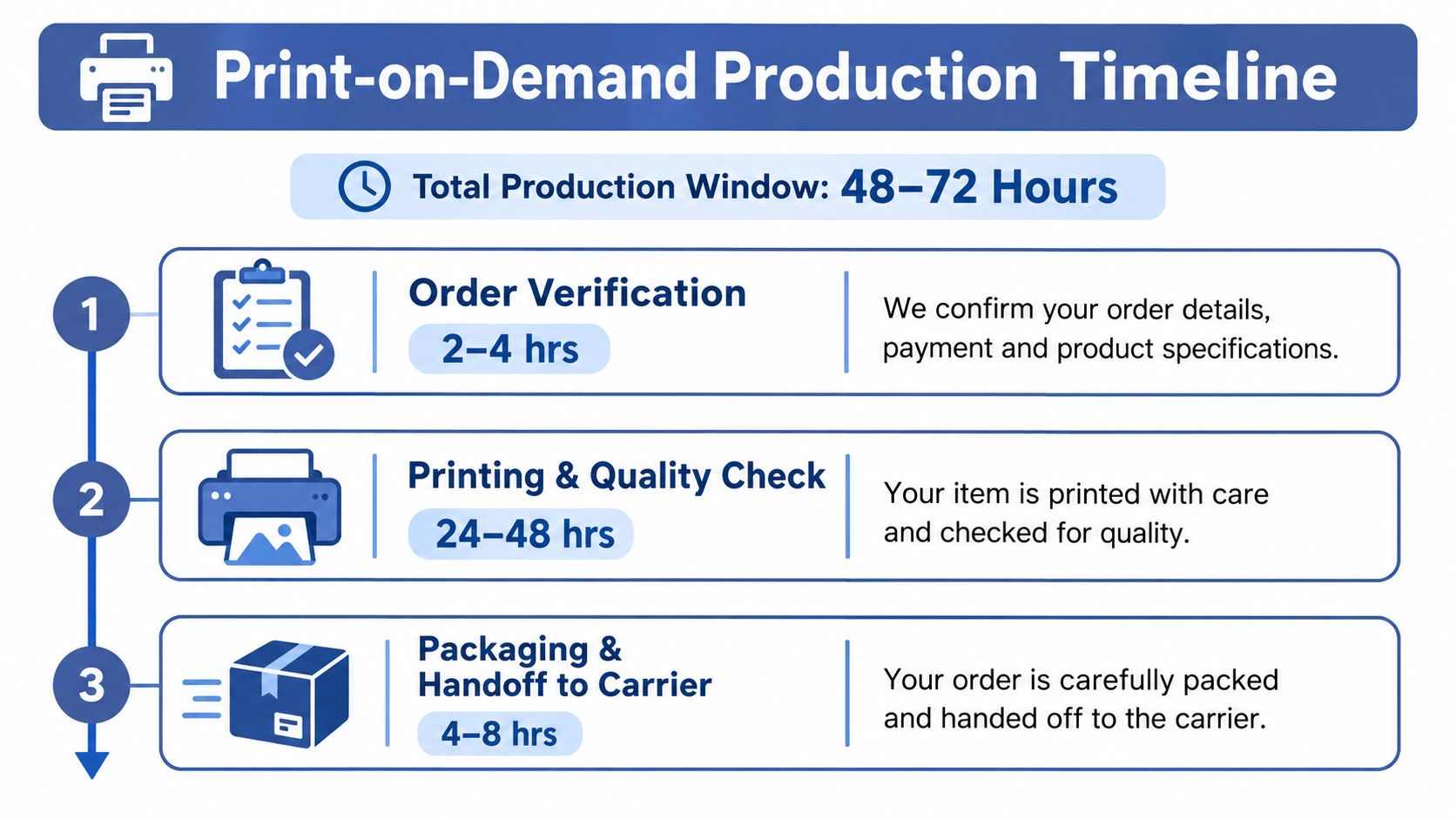
A customer may wait several days for an order that took only minutes to print. The delay often starts earlier, in artwork approval, product routing, payment checks, or destination compliance. At the platform level, a realistic POD production window is typically 48 to 72 hours from order placement to shipment, according to Printify's production timeline guidance. That estimate covers production activity, not the complete customer-facing journey.
Phase one starts before printing
Order verification checks the product, variant, destination, payment status, and available fulfillment path. Artwork approval may occur at the same point. If a file needs human review, production may not begin until someone clears the asset.
Run standardized print files through automated preflight checks before the order reaches the supplier. Validate dimensions, placement, transparency, color requirements, and product compatibility. Route exceptions to a review queue with a defined owner, rather than allowing every order to stop in the same manual queue.
Phase two is production and quality control
Printing, embroidery, or another decoration method begins after verification clears. The item then moves through quality control, where the supplier checks whether it is suitable for shipment. Made-to-order production commonly takes 2 to 5 business days, while embroidery, engraving, and peak seasons can extend that period, according to Qianshi Wear's fulfillment overview.
The production queue can create a longer delay than the decoration itself. Supplier capacity, product availability, and routing rules determine which facility receives the order and how quickly work begins. Set routing rules by product, destination, and facility capacity, then alert the team when an order falls outside the expected path.
Phase three includes the carrier journey
Packaging and carrier handoff end production, not delivery. Domestic shipping often adds about 3 to 5 business days, while international shipping from a distant facility can add 1 to 3 weeks. Use the same fulfillment reference for these shipping expectations, rather than treating carrier time as another production estimate.
Custom apparel manufacturing runs on a different schedule. Simple decorated garments are commonly quoted at 7 to 15 business days, low-MOQ or ODM runs at 15 to 30 days, and OEM custom apparel at 25 to 40 days. More complex fashion production can take 12 to 20 weeks after sample approval, according to Shirt.co's apparel production timeline.
Track each handoff, from artwork clearance through carrier acceptance. Practical production scheduling tips can help organize batches, expose queue conflicts, and keep compliance or routing exceptions from extending the customer's timeline unnoticed.
Building Your Custom Production Timeline Template
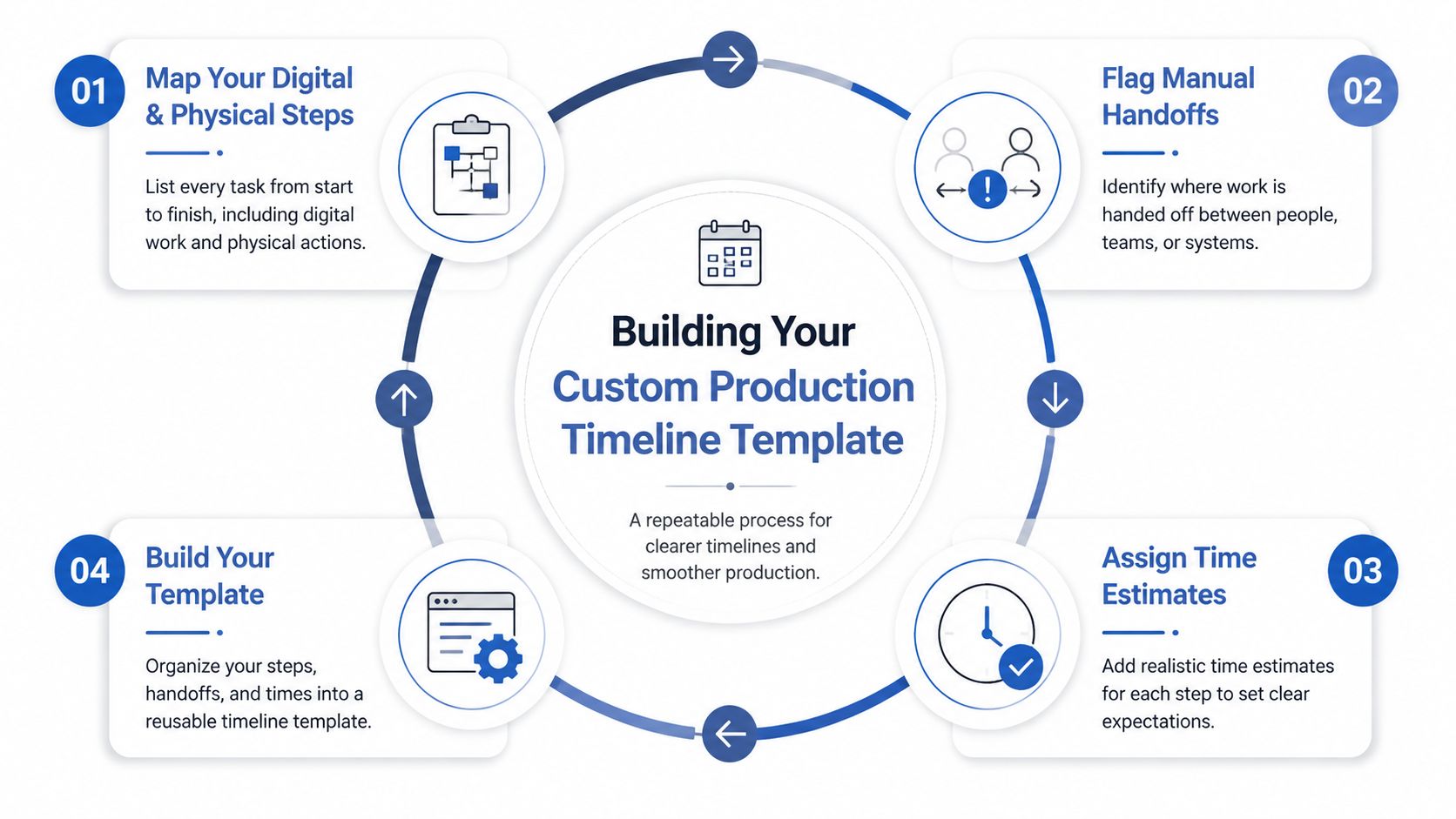
A useful template reflects your actual workflow, not a generic supplier promise. Start by writing every digital and physical step from listing creation through delivery. Include tasks that feel small, such as artwork export, product mapping, order verification, routing, quality review, packing, carrier pickup, and customer notification.
The purpose is to find the critical path, the sequence that determines when the customer can receive the order. If artwork approval must finish before production can start, those tasks are dependent. If a tracking email can send after carrier handoff without blocking production, it belongs on a parallel path.
Map the workflow before automating it
Create one timeline for each meaningful product category or supplier path. A heavyweight embroidered garment may need different checkpoints from a standard printed tee. An international order also needs destination-specific checks that a domestic order may not.
Then flag every manual handoff. Look for moments where a person must download a file, inspect it, approve it, choose a facility, update a spreadsheet, or notify a customer. Manual work isn't automatically bad, but it becomes a bottleneck when volume rises and no one owns the queue.
A simple template might contain these fields:
- Order trigger: The event that starts the workflow.
- Required asset: The approved print file, mockup, product mapping, or destination information.
- Owner: The person, system, or supplier responsible for the task.
- Expected duration: A realistic qualitative or sourced time estimate.
- Dependency: The task that must finish first.
- Exception action: What happens when the step fails.
- Customer update: The message sent when status changes.
Start the clock with clean assets
The most effective automation happens before order placement. Standardize file naming, product specifications, placement rules, and approved variants. Run artwork preflight checks automatically, then route only valid orders into fulfillment.
AvatarIQ fits into the design-to-listing portion of this workflow. It can generate apparel designs, create mockups and photoshoots, and reduce the time between an approved concept and a publishable listing. The operational value isn't just speed. Consistent assets create fewer approval interruptions once orders arrive.
Document the workflow so another person can follow it without asking you to interpret every step. A clear process documentation framework helps turn personal knowledge into repeatable operating procedures.
Finally, configure routing rules around facility proximity, product capability, inventory availability, and destination. Sending an order to the nearest suitable facility can reduce unnecessary transit exposure, but proximity shouldn't override quality or product compatibility. The right rule is the one that balances production reliability with delivery distance.
Communication Strategies That Prevent Delays
A timeline fails when people interpret statuses differently. “In production” might mean the order is waiting for a queue, actively being printed, or held for quality review. Suppliers and customers need messages that describe the next meaningful event, not vague reassurance.
Start with suppliers. Agree on the expected response for a normal order, the information required for an exception, and the person responsible for escalation. Put those expectations in writing, then connect status changes to automated notifications wherever the platform allows it.
Use a supplier communication framework
A practical supplier update should answer four questions:
- What happened? State the current status.
- What is blocking progress? Name the missing file, capacity issue, address problem, or compliance check.
- Who owns the next action? Identify the responsible party.
- When will the next update arrive? Give a specific checkpoint without promising an outcome you can't control.
Escalation should also be structured. A failed artwork check can go back to the design workflow. A production queue issue belongs with the supplier. A carrier exception needs tracking review. Routing each problem to the right owner prevents your support inbox from becoming the central operations department.
For reusable language across suppliers, teams can adapt these communication templates to match their own statuses and escalation rules.
Set customer expectations before checkout
Your product page should separate production time from shipping time. Customers can then understand that the item is made after purchase and that the carrier journey depends on destination. Avoid promising a single arrival date when multiple stages remain outside your direct control.
The shipping confirmation should confirm what has happened, not imply that delivery is imminent. A useful message tells the buyer that the order has been handed to the carrier, provides tracking, and explains that the first scan may appear after the handoff.
When a delay occurs, send the notice as soon as the exception is credible. Explain the affected stage, give the latest available expectation, and tell the customer what you're doing next. Proactive communication costs less than repeated “where is my order?” replies, and it protects the trust that makes a buyer comfortable ordering again.
Common Production Delays and How to Fix Them
The common assumption is that printing is the main risk. It often isn't. The bigger problems appear at the boundaries between systems, people, suppliers, and carriers.
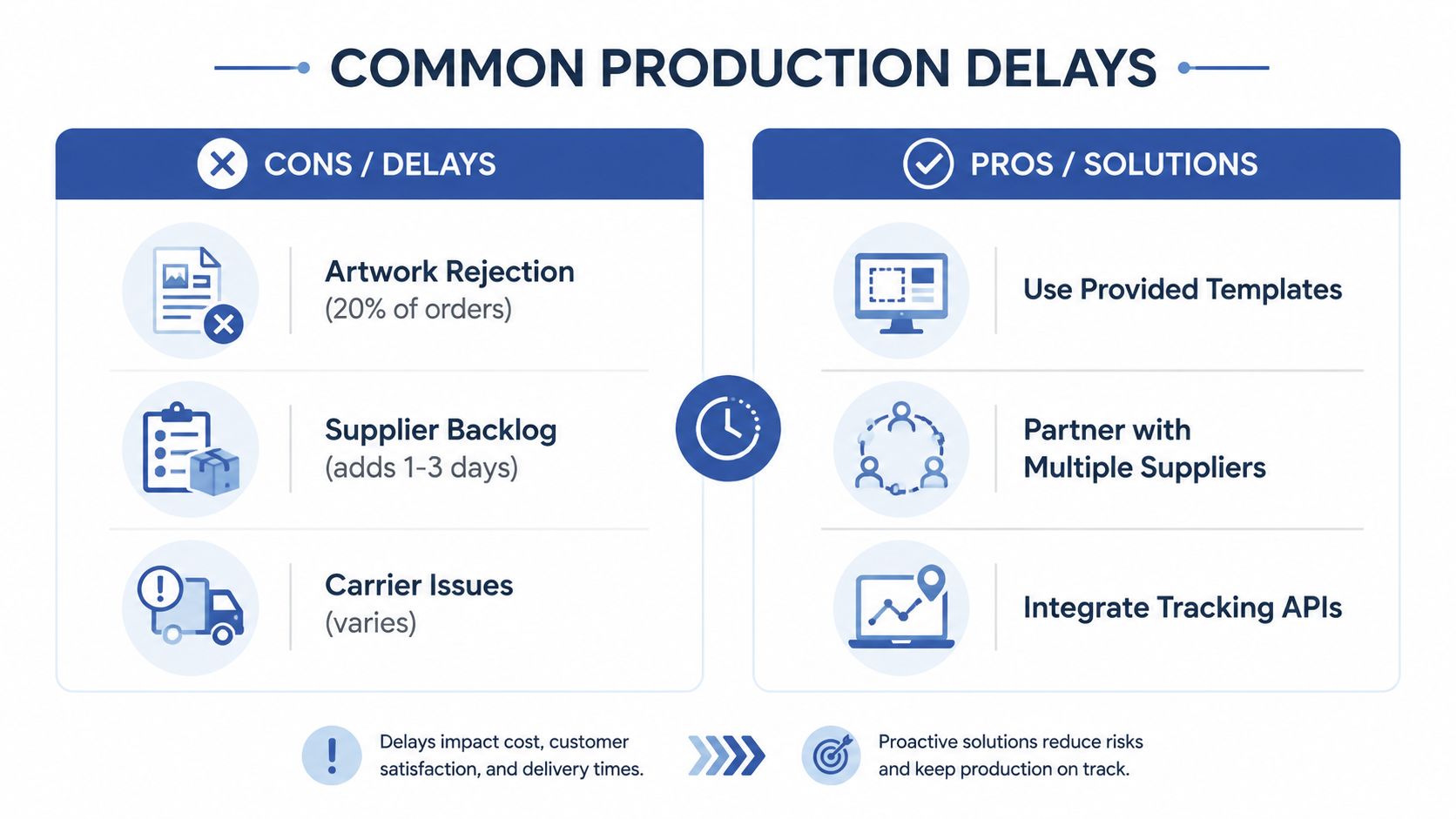
Artwork rejection is one of the clearest examples. A file can look acceptable in a design workspace but fail against a product's print area, transparency rules, resolution requirements, or placement constraints. The fix is to validate assets before the order reaches fulfillment, maintain product-specific templates, and prevent unapproved files from entering the live catalog.
Supplier queues require capacity planning
Peak demand can create a backlog even when a supplier normally performs well. A supplier may accept orders while its queue expands, leaving you with a fulfillment estimate that no longer matches the customer promise. Monitor status patterns, ask for current capacity information, and keep an alternate supplier configured for important products.
Supplier diversification doesn't mean sending every order randomly. It means knowing which provider can handle each product, region, decoration method, and quality requirement. Test the backup route before you need it, because an untested contingency is only a theory.
Carrier and customs problems need separate treatment
A carrier can delay a package after production is complete. Tracking may show a stalled scan, an address exception, or a transfer between facilities. Integrating tracking data into your support workflow lets the team distinguish a production issue from a transit issue before responding.
International orders add customs exposure. Apparel lead time includes sourcing, design, sampling, bulk production, quality checks, and shipping, not just sewing, as described by Thygesen Apparel's lead-time explanation. For custom apparel, a phase-based benchmark lists sample production at 2 to 6 weeks, bulk production at 3 to 10 weeks, freight at 1 to 6 weeks, and customs at 1 to 7 days, according to OneAim Apparel's country benchmark.
Operational insight: Build the exception path before the first exception arrives.
Add a buffer to customer-facing promises, but don't hide behind an oversized estimate. Review actual order histories by product and destination, identify where the variance occurs, and adjust the relevant stage. A broad promise can conceal a broken workflow, while a stage-level review shows whether the problem is artwork, capacity, routing, or transit.
Your Action Plan for Timeline Mastery
Start with the fastest operational wins. Audit a recent group of orders and record every status transition, including the moments when nothing appeared to happen. You're looking for waiting time, repeated approvals, unclear ownership, and orders that travel farther than necessary.
Then put the workflow in this order:
- Standardize assets. Create approved print specifications for each product and decoration method.
- Automate preflight. Stop invalid artwork before it reaches a supplier queue.
- Define routing rules. Choose the nearest suitable facility based on capability, destination, and reliability.
- Separate production from shipping. Display both stages clearly on product pages and notifications.
- Create exception ownership. Decide who handles artwork failures, supplier backlogs, carrier issues, and customs questions.
- Review the timeline regularly. Improve the stage that creates the most customer-visible delay.
The broader opportunity is exciting because POD lets you build and test an apparel business without taking on the same inventory commitment as traditional manufacturing. You can start lean, learn from real customer demand, and improve the operating system as orders grow. Timeline mastery turns that flexibility into something sustainable, giving you more control over customer experience and more room to build a business around your life.
You don't need a perfect operation on day one. You need a visible workflow, clean assets, reliable partners, and the discipline to fix the first bottleneck you can see.
Skup helps POD entrepreneurs build repeatable apparel workflows through practical education, operational guidance, and tools such as AvatarIQ for faster design and mockup creation. Visit Skup to explore resources that can help you turn a clearer production timeline into a more scalable ecommerce business.