Facebook Ads for Beginners: A Practical POD Launch Guide
Most beginners think Facebook ads get easier when targeting gets more precise. In 2026, the opposite is often closer to the truth. Meta reported $59.36 billion in advertising revenue in Q2 2026, with ad impressions delivered up 14% and the average price per ad up 12%, while its apps reached 3.56 billion daily active people in March 2026. That's a massive auction, and the brands that feed it clean purchase data and fresh creative usually have more of an edge than beginners who build complicated interest stacks. (Meta advertising scale and 2026 context)
For print-on-demand, this creates an exciting entry point. You can launch a focused apparel idea, test how a niche responds, and build a sales system without purchasing inventory upfront. But profitable Facebook ads for beginners require two habits from day one: refresh creative before the audience gets tired, and give Meta reliable conversion signals instead of trying to outsmart its delivery system.
Table of Contents
- Why Facebook Ads Matter for Print-on-Demand in 2026
- Setting Up Your Meta Business Manager and Ad Account
- Building Audiences That Actually Convert
- Designing Creatives and Mockups That Sell Apparel
- Budgets, Bidding, and the Learning Phase
- Policy Pitfalls and Troubleshooting Common Issues
- Your First Campaign Template and Starter Budget
Why Facebook Ads Matter for Print-on-Demand in 2026
Meta's advertising system is large enough to change how you think about audience building. You aren't waiting for a small group of people to discover a new POD store. You're entering an auction that can place an apparel concept in front of relevant shoppers across Facebook, Instagram, Messenger, and other Meta placements, with delivery shaped by your objective, audience signals, budget, and creative quality.
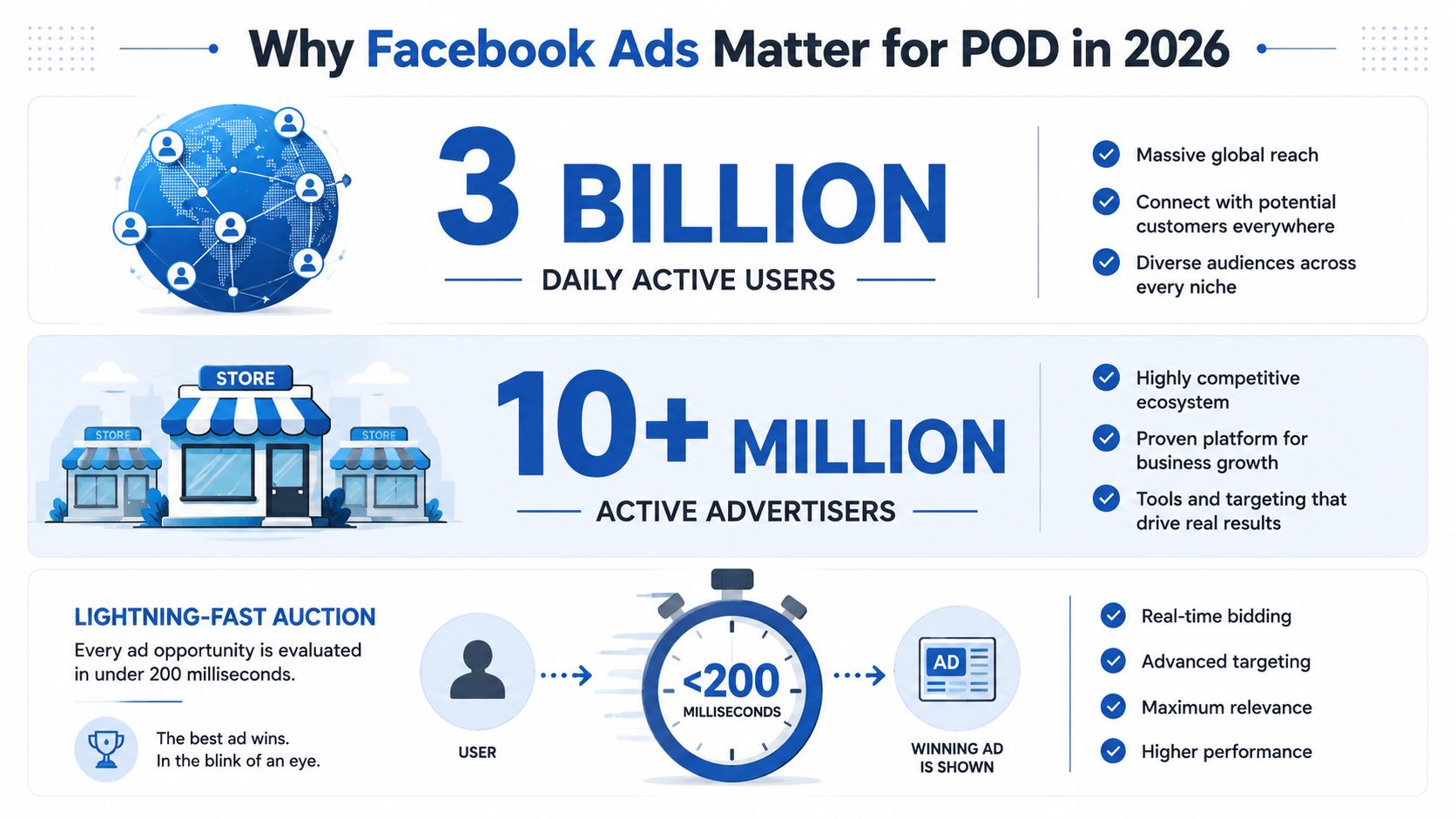
Meta's scale matters because a beginner doesn't need to own a giant audience. You can rent access to one, then let the platform search for people likely to respond. A 2026 benchmark report estimated that 94% to 98% of Meta traffic came from mobile, so the opportunity comes with a clear responsibility: your ad, product page, sizing information, checkout, and post-purchase experience all need to work on a small screen. (Mobile traffic and Meta ad benchmarks)
Apparel fits this environment unusually well. A shirt communicates visually, identity-based niches are easy to express through design, and a product can appear in a lifestyle scene rather than as a technical specification sheet. A fishing joke, a profession-based design, or a family identity can make the product instantly understandable while giving the viewer a reason to stop scrolling.
POD also gives you a forgiving learning environment compared with categories that require complex explanations, heavy technical support, or highly regulated claims. You can test a design angle, offer, landing page, and creative treatment without committing to a warehouse full of stock. That doesn't remove the need for disciplined economics, but it lets you learn paid social through rapid product feedback.
The beginner advantage: You're not trying to find one perfect audience. You're trying to discover which combination of design, message, offer, and buyer signal deserves more attention.
Two realities should shape every campaign you launch. First, creative fatigue can arrive quickly. A 2026 analysis covering more than 550,000 ads and about $1.3 billion in spend found that roughly half of creatives were switched off before 28 days, and only 4% to 8% became winners. (Meta creative refresh benchmarks) Second, Meta's systems increasingly depend on reliable first-party conversion data and automated delivery. Meta reported that AI-driven improvements lifted Facebook ad clicks by 3.5% in Q4 2025, while Instagram conversions gained more than 1%. (Meta AI performance update)
That's why POD is such a strong classroom. You can move quickly, learn from real purchase behavior, and build the creative operating system that makes scale possible.
Setting Up Your Meta Business Manager and Ad Account
Your first campaign shouldn't begin with an ad. It should begin with a clean asset structure that you can still understand months later.
Build the foundation in the right order
Start at Meta Business Manager with a clean business email that your store team controls. Create the Business Manager first, then request or purchase your own ad account. Avoid shared Business Manager rentals from gray-market sellers. You don't control the history, billing access, permissions, or policy risk attached to those assets.
Use a naming convention that makes future audits simple, such as POD-Store-Name-BM-2026. Apply the same logic to your ad account, Page, Pixel, catalog, and campaigns. Clear names save time when you're troubleshooting a rejected ad or handing access to a contractor.
Follow this order:
- Create the Business Manager. Add the legal business details and verify the primary email.
- Add the ad account. Use an account owned by your business, not a borrowed account with an unknown history.
- Claim or create the Facebook Page. Tie it to the POD storefront and assign appropriate Page roles to anyone who needs access.
- Install the Meta Pixel. Use your ecommerce platform's native integration where available.
- Connect Conversions API. The Pixel ID comes first because the browser Pixel and server-side events need matching event IDs to deduplicate correctly.
For a detailed walkthrough of the technical installation, use this Facebook Pixel setup guide for print-on-demand stores.
Verify events before spending
Open Events Manager and send a test event. Confirm that the Pixel fires on AddToCart and Purchase, then check that Conversions API receives matching event IDs. A healthy setup should show browser and server activity without counting the same action twice.
Don't launch traffic while your tracking is still uncertain. A common beginner error is assuming that impressions or clicks equal useful learning. Meta needs purchase-related signals to find more buyers, and broken tracking can make every campaign behave as if it's starting from zero.
Meta's six campaign objectives become easier to understand when translated into POD outcomes:
- Awareness introduces a new brand or launch tee to a wider audience.
- Traffic sends people to a product page, but it optimizes for visits rather than purchases.
- Engagement can produce inexpensive likes, comments, or video interactions, though those actions don't necessarily buy shirts.
- Leads fits an email-capture page with a compelling incentive, not a standard product launch.
- App Promotion has little relevance for a typical POD storefront.
- Sales is the core choice when your goal is completed purchases.
Choose Sales when revenue is the goal. If your Pixel has fewer than 50 purchases in the last 28 days, keep the structure simple with one broad Sales campaign at $20 per day. If it has more than 50 purchases, add a separate retargeting Sales campaign for cart abandoners and product-page visitors. These account thresholds are a practical operating framework, not a guarantee of performance.
Inside Ads Manager, think in a simple hierarchy: one Campaign, one Ad Set, multiple Ads. Launching five ad sets on day one spreads the budget and gives each segment less conversion data. Meta's learning guidance commonly uses about 50 optimization events within roughly 7 days after the last significant edit as a threshold for leaving the learning phase. (Meta learning-phase budget guidance)
Choosing Traffic to “get more data” is usually the wrong shortcut. You'll collect clicks, but the system will look for people who click, not necessarily people who purchase. Optimize for the business result you need.
Building Audiences That Actually Convert
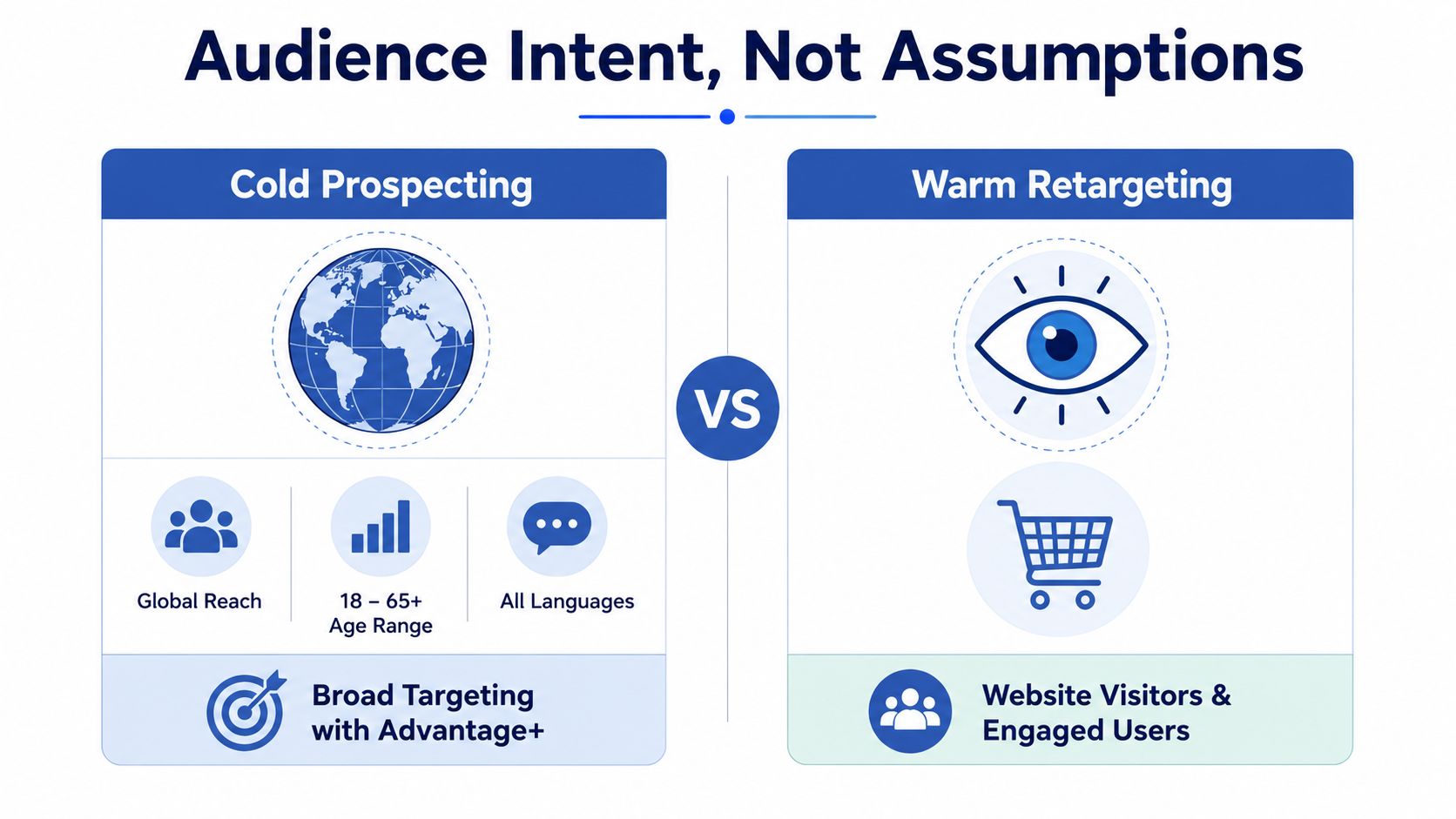
Audience strategy for POD starts with intent, not a long list of hobbies. A person who likes a broad interest isn't automatically a buyer, while a shopper who viewed a specific product has already shown meaningful commercial behavior.
For cold prospecting, select the correct country, age range, and language, turn on Advantage+ placements, and keep the audience broad enough for Meta to find purchase patterns. Independent guidance places a minimum viable prospecting audience around 500,000 people, with an optimal range of 1 million to 5 million for budgets near $100 per day. (Meta audience sizing guidance)
You don't need to begin at the top of that range. The useful lesson is to avoid constructing an audience so narrow that delivery becomes unstable. If an initial guardrail helps, an audience of 1 million or more is generally more useful than hundreds of stacked interests.
Match the audience to the buyer's behavior
Retargeting can be smaller because it uses evidence of prior engagement. Build product-relevant groups from:
- Recent site visitors, especially people who viewed a product.
- Add-to-cart users, with messaging that addresses hesitation.
- Instagram engagers, who may recognize the brand but haven't visited the store.
- Video viewers, when the content communicates the design or product clearly.
- Prior customers, for complementary products or new drops.
Use separate 7-day, 14-day, and 30-day windows where policy and audience volume allow. Exclude purchasers from acquisition campaigns so your prospecting budget focuses on new buyers. Keep in mind that Meta's estimated audience size can overstate the reachable audience, so compare the estimate with the actual available reach shown in Ads Manager.
A practical structure is one broad prospecting ad set, one retargeting ad set, and clear exclusions. Don't create dozens of overlapping custom audiences. Once you have a stable baseline, test broad delivery against one carefully chosen interest. That comparison tells you whether the interest adds value, instead of leaving you guessing inside a complicated launch.
For more advanced audience modeling, this guide to Facebook lookalike audiences for print-on-demand can help you decide when a customer-based expansion makes sense.
Designing Creatives and Mockups That Sell Apparel
Your creative is not a finishing touch. It's the campaign's first targeting layer because the image, opening line, and product context determine who stops and who scrolls.
Start with AvatarIQ to research POD angles and turn each promising insight into a short concept. A useful concept contains a clear visual or text hook in the opening two seconds, one design shown in a lifestyle setting, and a direct benefit or identity statement.
Build each concept as a small test
Show the shirt in motion, on a real person, or beside a situation that makes the design relevant. A static catalog mockup can look like a product listing, while a person wearing the shirt gives the viewer context for fit, mood, and identity.
Create at least three variations for each concept:
- Square: Useful for feed placements and product-focused compositions.
- Vertical: Designed for mobile-first Stories and Reels environments.
- Landscape: Helpful when the scene or demonstration needs more horizontal space.
Keep the product and offer consistent enough to compare results. Change one meaningful variable at a time, such as the hook, model, setting, opening frame, or product proof. Add captions to videos, use readable text, and place the most important message where mobile viewers can see it immediately.
If your internal production capacity is limited, a curated resource for top unlimited design services can help you evaluate outside support without losing sight of the creative testing process. For apparel-specific visuals, use an apparel mockup generator to produce product scenes that fit your campaign angles.
Treat fatigue as an operating schedule
A creative log keeps emotion out of the decision. Record the angle, format, spend, purchases, click-through rate, frequency, and what you learned. When an ad's frequency rises while clicks or purchases weaken, refresh the hook, background, model, or opening instead of endlessly editing the audience.
The 2026 benchmark evidence is clear enough to change your workflow. Roughly half of analyzed creatives were turned off before 28 days, and only 4% to 8% became winners. That means your advantage comes from producing useful variations consistently, not from hoping one design runs forever. (Creative fatigue data)
Budgets, Bidding, and the Learning Phase
A small budget can launch a campaign, but a fragmented budget struggles to teach an ad set anything useful. Meta's reported minimum daily budget is $1 for impression-based campaigns and $5 for campaigns optimized for clicks, conversions, or other low-frequency events. For cost-per-result campaigns, the minimum daily budget must be at least five times the target cost per result. (Meta minimum budget requirements)
For a POD sales test, a practical starting point is $20 to $30 per day per ad set, with consolidation preferred over multiple tiny ad sets. If you're working with $25 per day, a simple split could place approximately $20 into broad prospecting, $3 into warm retargeting, and $2 into creative testing. Adjust that split only after the campaign has enough delivery to reveal a pattern.
| Area | Beginner Starting Point | What to Watch |
|---|---|---|
| Prospecting | $20 per day | Purchases, purchase value, outbound CTR |
| Retargeting | $3 per day | Add-to-cart recovery and cost per purchase |
| Creative testing | $2 per day | Hook response, frequency, early purchase signals |
| Optimization event | Purchase | Stable event volume and tracking quality |
| Learning phase | About 50 events in roughly 7 days | Avoid edits that restart learning |
Choose Sales and optimize for the conversion event closest to revenue. Use the highest-volume Pixel and Conversions API event your store can support accurately. Don't manipulate bids unless delivery is unstable. Most beginner problems come from weak offer-market fit, tired creative, or insufficient event volume, not from a bid setting.
Watch spend, purchases, cost per purchase, purchase conversion value, outbound CTR, and frequency. A benchmark dataset reported a global average Meta CTR of 1.49%, average CPC of $0.83, and average CPM of $9.40 in 2026, while another Facebook marketer report cited an average CTR of 2.59%, showing how much results vary by objective, format, audience, and placement. (Meta benchmark economics)
Scale by increasing budget modestly, adding proven creatives, or testing a new audience. Don't change targeting and creative at the same time, because you won't know which change affected the result.
Policy Pitfalls and Troubleshooting Common Issues
A rejected apparel ad usually isn't a verdict on the product. It's often a wording, image, trademark, or category problem that you can fix before spending more time or money.
Avoid personal-attribute claims such as “lose weight fast shirts.” Don't use before-and-after imagery, disease language, or copy that implies you know a viewer's sensitive condition. Don't use trademarked characters or misleading prices. A phrase like “skinny jeans” may invite a different review than a neutral product description such as “vintage-inspired denim fit,” provided the product and claim are accurate.
Know the restricted categories
Meta's Special Ad Categories apply to housing, employment, credit, and social-issue, electoral, or political ads. These categories remove age and gender targeting and limit detailed targeting and location options. (Special Ad Category restrictions)
A standard POD shirt campaign normally won't fall into those categories, but a design or message can still create review risk if it implies a sensitive personal trait or uses political content. Meta's review can also examine audience names, metadata, and creative context when sensitive traits are implied.
Use a simple recovery path
- Rejected ad: Open Ads Manager, select the campaign, ad set, or ad, review the delivery status, and open the rejection details. Edit the flagged copy or media, then request another review.
- Restricted account: Go to Account Quality, identify the affected asset, read the policy reason, and submit an appeal only after correcting the underlying issue.
- Payment decline: Open Billing and Payments, review the failed transaction, confirm the payment method, and resolve any bank verification request before relaunching.
- Pixel not firing: Open Events Manager, inspect Test Events, check the store integration, and verify ViewContent, AddToCart, and Purchase events.
- Impressions with no conversions: Check the product page, price clarity, sizing, shipping information, checkout, event tracking, and the message match between ad and landing page.
Before launch, review every claim, design element, URL, price, and product image. Keep screenshots of the rejection reason and your changes. If something breaks before a major sales weekend, pause affected ads, preserve the campaign structure, correct the policy or tracking issue, and contact Meta support through the relevant Account Quality or Business Help path instead of repeatedly duplicating the problem.
Your First Campaign Template and Starter Budget
A new POD store needs a campaign you can inspect, not a maze of settings. Use an Advantage+ Shopping Campaign structure with one Sales campaign, one broad ad set, six creatives, and a $25 daily budget. Let it run for 7 days before making the first serious read, unless tracking or policy issues require an immediate pause.
Assemble the campaign
At the campaign level, select Sales. At the ad set level, choose the store's country, confirm the purchase event, use broad targeting, and enable Advantage+ placements. Turn on dynamic creative if the account setup supports it, then confirm that Pixel and Conversions API events map correctly to ViewContent, AddToCart, and Purchase.
Use this creative matrix:
- Three UGC-style videos: Show the shirt being worn, opened, styled, or discussed naturally.
- Two static mockups: Use different settings or models while keeping the offer comparable.
- One carousel: Present related bestsellers or several designs from the same niche.
For the first week, keep the total test budget at $175, which equals $25 per day for 7 days. The allocation below gives the campaign a testing center while reserving money for warm traffic and fresh creative.
| Campaign Bucket | Daily Budget | 7-Day Total | Goal |
|---|---|---|---|
| Broad prospecting test | $14.29 | $100 | Find purchase-capable creative and audience signals |
| Warm retargeting | $3.57 | $25 | Reconnect with engaged visitors and shoppers |
| Creative refresh | $7.14 | $50 | Produce and test two new ad variations |
| Total | $25.00 | $175 | Run a controlled first-week test |
The creative refresh bucket doesn't need to be a separate delivery ad set if your account is too small for that structure. Treat it as reserved operating budget for two new variations, then introduce them without changing several other variables at once.
Read the campaign through the funnel. If CTR is weak, your hook or visual likely needs work. If people click but don't add to cart, inspect the product page and offer. If add-to-carts occur but purchases don't, inspect shipping clarity, checkout friction, price presentation, and payment confidence. A large benchmark set reported ecommerce purchase conversion performance around 1.6%, median ROAS near 1.86, and median CPA around $38.99, while ecommerce conversion rates often cluster around 2% to 4% depending on category. Use those figures as directional context, not promises, and judge your own contribution margin before scaling. (Facebook ecommerce benchmarks)
Don't kill an ad because it has one quiet hour. Do kill a weak angle when the evidence is consistent. The requested decision rule for this starter framework is to scale winners, stop anything under 1% CTR or $5 CPA, and duplicate only after 50 purchases per ad set. Treat those thresholds as operating rules for this test, not universal laws for every account.
Once the first campaign is running, build your broader store process around proven launch tactics for POD sellers. Your first profitable campaign may look modest, but it can teach you which designs deserve more inventory-free testing, which message attracts buyers, and which creative system can support the next launch. Every established POD operation began with a first campaign small enough to monitor closely.
Skup offers practical POD education through its Apparel Cloning System, while AvatarIQ supports faster apparel design and mockup production for creative testing. Visit Skup to explore the tools and guidance that can help you turn this Facebook ads plan into your first focused POD launch.