How to Use Google Ads for Print on Demand: Complete 2026 Guide
What Are Google Ads and Why Should POD Sellers Care?
Google Ads puts your print on demand products in front of people who are actively searching for what you sell. Unlike social media ads where you interrupt someone’s scroll, Google Ads captures intent—someone types “funny dog t-shirt” and your product appears.
For POD sellers, this means higher-quality traffic. These aren’t cold audiences who’ve never heard of you. They’re buyers with credit cards out, looking for exactly what you offer.
Google Ads vs Facebook Ads: Which Is Better for POD?
Here’s the honest truth: both have their place.
Google Ads wins when:
- Your niche has search volume (people actively searching for your product type)
- You want to capture buyer intent
- You’re targeting specific occasions (gifts, events, holidays)
Facebook Ads wins when:
- You’re creating demand for products people didn’t know they wanted
- Your designs are visually striking and scroll-stopping
- You’re building brand awareness
Smart POD sellers use both. Google captures existing demand. Facebook creates new demand.
Setting Up Your First Google Ads Campaign
Here’s how to launch your first campaign without wasting money:
Step 1: Create a Google Ads Account
Go to ads.google.com and sign up. Google will try to push you into “Smart Campaigns”—skip this. You want full control. Click “Switch to Expert Mode” at the bottom.
Step 2: Choose Your Campaign Type
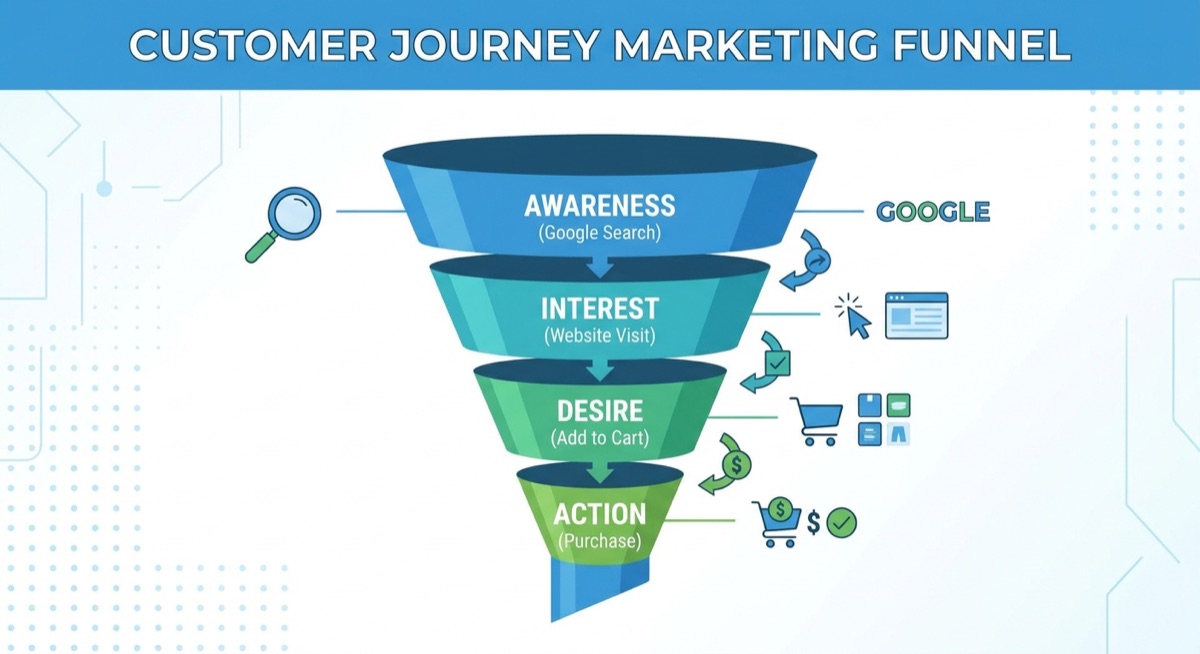
For POD products, start with Performance Max or Shopping campaigns. These show your actual product images to searchers, which converts better than text ads for apparel.
Step 3: Connect Your Product Feed
You’ll need Google Merchant Center connected to your Shopify store. Apps like “Google & YouTube” (free from Shopify) sync your products automatically.
Step 4: Set Your Budget
Start with $10-20/day. This gives Google enough data to optimize without burning through cash. Most beginners set budgets too low ($5/day) and wonder why they get no results—Google needs room to test.
Step 5: Define Your Targeting
For POD:
- Target your home country first (US, UK, etc.)
- Exclude countries with low buyer intent
- Let Google handle audience signals initially
Google Shopping vs Performance Max: Which to Use
Google Shopping: You control everything. Pick your products, set bids, choose audiences. More work but more control.
Performance Max: Google’s AI handles optimization across all Google properties (Search, Shopping, YouTube, Display). Less control but often better results for beginners.
Our recommendation: Start with Performance Max. It’s more forgiving for new advertisers and Google’s AI has gotten genuinely good at finding buyers.
Keywords That Convert for Print on Demand
Not all searches are equal. Here’s what to target:
High-intent keywords:
- “buy [niche] t-shirt”
- “[niche] shirt for [occasion]”
- “[niche] gift for [person]”
- “funny [niche] hoodie”
Keywords to avoid (low buyer intent):
- “free t-shirt designs”
- “how to make t-shirts”
- “t-shirt template”

How Much Should You Spend on Google Ads?
Here’s a realistic budget breakdown:
Testing phase (first 2 weeks): $10-20/day
Goal: Find what works. Don’t expect profit yet.
Optimization phase (weeks 3-4): $20-30/day
Goal: Double down on winners, cut losers.
Scaling phase (month 2+): $50-100+/day
Goal: Profitable scale on proven products.
The #1 mistake? Giving up too early. Google’s algorithm needs 30-50 conversions to fully optimize. That takes time and budget.
Common Google Ads Mistakes POD Sellers Make
Mistake 1: Not using negative keywords
Add negatives like “free,” “template,” “DIY,” “how to make.” These filter out people who’ll never buy.
Mistake 2: Weak product images
Your Shopping ads show your product photos. Blurry mockups kill conversions. Use clean, professional images.
Mistake 3: Generic product titles
“Funny T-Shirt” won’t cut it. Be specific: “Funny Dog Dad T-Shirt – Gift for Pet Lovers – Soft Cotton Tee”
Mistake 4: Ignoring ROAS targets
Set a target ROAS (Return on Ad Spend) of 2.0 to start. This tells Google to find buyers, not just clickers.
Tracking Results: What Metrics Matter
Focus on these:
- ROAS (Return on Ad Spend): Revenue ÷ Ad Spend. Aim for 2.0+ to be profitable.
- Cost per conversion: Keep this below your profit margin.
- Click-through rate: 1%+ is healthy for Shopping ads.
- Conversion rate: 2-3% is typical for POD stores.
Don’t obsess over impressions or clicks alone. Conversions and ROAS pay the bills.
Real Results: What to Expect
Let’s be realistic. Here’s a typical timeline:
Week 1: Learning phase. Spend money, get data. Probably not profitable.
Weeks 2-3: Patterns emerge. Some products get clicks, others don’t.
Week 4+: Optimization kicks in. ROAS improves as Google learns.
Inside Skup, we’ve seen students hit 3-4x ROAS on Google Ads once they nail their product selection and feed optimization. But it takes patience—usually 30+ days before you see consistent results.
Should You Use Google Ads for Your POD Store?
Google Ads works best if:
- Your niche has search volume
- You have budget for 30+ days of testing
- Your product photos are solid
- You’re willing to learn the platform
If you’re brand new to POD, master one traffic source first (usually Facebook). But once you’re profitable there, Google Ads becomes a powerful second channel that captures buyers your competitors are missing.
The best POD businesses don’t rely on one platform. They diversify. Google Ads is how you do that.
Frequently Asked Questions
How much do Google Ads cost for print on demand?
Expect to spend $300-600 for proper testing (2-4 weeks at $10-20/day). Cost per click varies by niche but typically runs $0.50-2.00 for POD products.
Are Google Ads worth it for small POD stores?
Yes, if your niche has search demand. Google Ads can be more efficient than social ads because you’re targeting people actively looking to buy, not interrupting their feed.
How long until Google Ads become profitable?
Most POD sellers see positive ROAS within 4-6 weeks if they’re testing properly. The algorithm needs data—typically 30-50 conversions—to optimize effectively.
Should I use Google Ads or Facebook Ads first?
Most beginners start with Facebook because it’s more forgiving and visual. Once you’re profitable on Facebook, add Google Ads to capture search intent and diversify traffic.
What’s a good ROAS for print on demand Google Ads?
A 2.0 ROAS (spend $1, make $2) is break-even for most POD margins. Aim for 2.5-4.0 ROAS once campaigns are optimized. Top performers hit 5.0+ on winning products.