Email Marketing for Beginners: How to Start in 2026
The most popular beginner advice is to grow your list fast and chase higher open rates. I'd start differently: earn permission, make the next click useful, and measure whether subscribers buy. A large audience isn't much of an asset if people don't remember signing up or never reach your product pages.
Email marketing for beginners doesn't need to mean complicated funnels or constant discounts. For a print-on-demand store, a focused signup offer, helpful automated messages, and relevant product recommendations give you a practical place to start.
Table of Contents
- Your Beginner Email Roadmap at a Glance
- How to Build a Permission-Based List From Zero
- Choosing Your First Email Platform
- Setting Up Welcome and Cart-Abandonment Flows
- KPIs to Track Instead of Vanity Numbers
- Segmenting Subscribers and Planning Your Campaigns
- Simple Email Templates to Start With
- Confirm Compliance Before You Hit Send
Your Beginner Email Roadmap at a Glance
A beginner store can start building toward email revenue through six setup phases, completed in order. Use this checklist to keep the work manageable, then return to it whenever you add a form, campaign, or automation.
Email setup roadmap for beginners
| Phase | What You Set Up | Done When |
|---|---|---|
| 1. Foundation | Sending domain, sender name, unsubscribe link | Test email lands in the inbox and the unsubscribe link works |
| 2. List | Signup form with consent wording and source tags | First subscribers arrive with a source recorded |
| 3. Platform | Account that supports manual campaign setup | A test campaign reaches your own address |
| 4. Flows | Welcome series and cart-abandonment flow | Both flows are live and tested with a dummy order |
| 5. Segments | Three starter groups by source and purchase status | Each campaign targets one named segment |
| 6. Measure | Click, conversion and unsubscribe tracking | You review the numbers every week |
You'll need a basic platform account to test the foundation, but don't spend the afternoon comparing advanced features. Get the sending identity and signup journey working before committing to a more elaborate setup.
Each phase has a completion test you can run in an afternoon. Automation delays still need a full timing check, so distinguish between successfully configuring a flow and confirming its real-world delivery.
Start small: A tested welcome email is more useful than an elaborate sequence that's still sitting in draft.
Email has been an important part of our business's success for over 10 years. The practical advantage is that you can improve a working message instead of rebuilding your customer communication from scratch every time you launch apparel.
You're also in good company: VistaPrint's 2024 small-business marketing report found that 78% of surveyed small businesses had experimented with or invested in new marketing approaches during the previous year, including email marketing.
Start now. Every properly tested flow gives future subscribers a useful experience without requiring you to press Send for each person.
How to Build a Permission-Based List From Zero
A useful email list begins with a clear exchange: someone gives you permission, and you deliver something they want. For apparel, that might be help choosing a fit, early access to a collection, or a relevant launch offer.
Build the signup journey
Choose a niche-matched lead magnet. A size guide, styling checklist, or launch-day discount should attract someone who might want your products. Skip unrelated giveaways that attract prize seekers rather than potential customers.
Place a clear form on the homepage and at checkout. Explain the benefit and the marketing messages subscribers can expect. Don't use pre-ticked consent boxes or make marketing permission look like a condition of buying.
Record the acquisition source. Tag signups as homepage, checkout, popup, or social post so you can compare their later behavior. Forgetting these tags leaves you unable to distinguish an effective signup placement from a source that produces little interest.
Enable double opt-in. Ask subscribers to confirm their address before entering promotional flows, which helps catch mistyped addresses and documents an additional confirmation action. The trade-off is an extra step, so make the confirmation instructions obvious.
Connect the signup journey to your authenticated sending identity. Use your store name as the recognizable sender and make sure confirmed contacts reach the right audience. A connected form isn't enough if it feeds an unused list.
Test with your own address. Aim for the confirmation message to arrive within a minute as an operational test, not a delivery guarantee. Complete the confirmation, inspect the source tag, and check the promised resource rather than stopping when the form displays a success message.
Keep permission specific
Under UK PECR, businesses generally need specific consent before emailing marketing to individual subscribers, according to the Information Commissioner's Office guidance on electronic mail marketing. Its limited soft opt-in requires details collected during a sale or negotiation, similar products or services, and an opt-out both at collection and in subsequent messages; it doesn't cover prospective contacts acquired through purchased lists.
Don't treat double opt-in as a substitute for clear consent wording. Keep the wording shown to subscribers alongside the signup source and confirmation record.
For practical placement ideas, use our email list-building guide. A healthy first hundred subscribers might come mostly from a couple of focused sources, with every contact tagged and none purchased. That's a useful starting audience, not a disappointing list size.
Choosing Your First Email Platform
Your first platform decision comes down to three questions: built-in or dedicated, how much automation now, and what happens to costs as you grow? Choose around the work you need to complete, not the longest feature list.
A store launching its first apparel collection needs reliable signup handling, product data, automated triggers, and purchase tracking. It probably doesn't need a complex multichannel dashboard before its welcome message works.
Email platform types compared for beginners
| Platform Type | Best For | Ecommerce Automation | Watch Out For |
|---|---|---|---|
| Built-in store email | Stores that want one login | Basic flows | Limited reporting and design options |
| Ecommerce-focused platform | Stores planning cart and post-purchase flows | Strong pre-built flows | Costs rise as the contact count grows |
| General email platform | Newsletter-first brands | Basic automations | Store triggers may need extra setup |
| All-in-one marketing suite | Stores also running SMS or ads | Broad feature set | Steeper learning curve |
These are buying categories, not guarantees about every product. Check the current plan's capabilities, especially whether automation, segmentation, and reporting require an upgrade.
Evaluate the work, not just the subscription
A built-in tool keeps administration straightforward, but limited reporting can make diagnosis harder. An ecommerce-focused platform can reduce integration work, while contact-based billing makes list maintenance more important.
A general email platform suits a content-led brand, provided its store integration passes the events you need. An all-in-one suite can coordinate more channels, but unused features still take time to understand and configure.
Our Shopify Email versus Klaviyo comparison helps narrow that particular built-in-versus-dedicated decision. Whichever direction you choose, inspect these capabilities:
- Sending authentication: Support for SPF and DKIM, with a clear verification workflow.
- Store events: Reliable purchase, checkout, and product information.
- Suppression handling: Automatic exclusion of unsubscribed contacts.
- Reporting: Delivered messages, clicks, purchases, and exportable results.
Choose control before complexity
The DMA and Marigold email benchmarking report reported 98% email delivery in 2024, with business-to-consumer delivery reaching 99.2%. Delivery means acceptance by the receiving system, not guaranteed inbox placement, so don't confuse a healthy delivery report with proof that everyone saw your message.
Manual campaign setup is usually better for beginners because it gives direct control over configuration and lets you test specific placements. Preview button positions, product blocks, audience exclusions, and mobile layouts yourself rather than accepting every preset.
I'd choose the tool you can set up in an afternoon and use to build a basic flow without a developer. You can add sophistication when a specific business need justifies it.
Setting Up Welcome and Cart-Abandonment Flows
Build the welcome flow before recovery messages. It serves people who deliberately asked to hear from you, making it the clearest place to test your promise, product positioning, and store integration.
Use the timeline as a visual guide, then configure the eligibility and purchase-exit rules carefully.
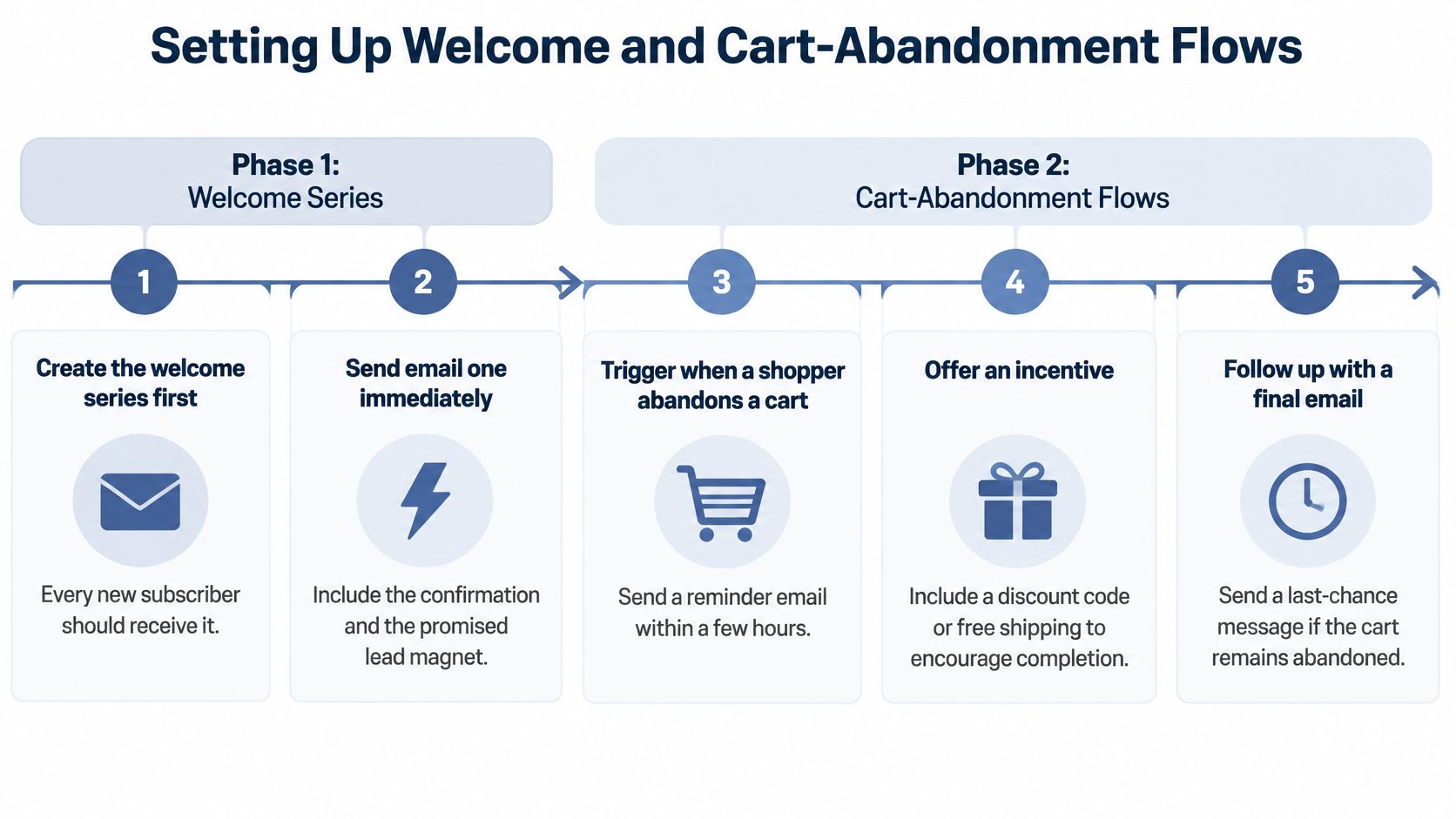
Build the welcome sequence first
The timings below are starting settings to test, not universal performance benchmarks.
Create the welcome series. Trigger it when a subscriber becomes eligible for marketing, after confirmation if you use double opt-in. Don't let imported contacts or repeat form submissions accidentally restart the sequence.
Send the first email immediately. Acknowledge the confirmed subscription and deliver the promised guide or offer. Keep any double opt-in confirmation message separate so promotional content doesn't arrive before the required confirmation.
Send the brand message on day two. Explain whom the store serves and why the niche matters. A cat-themed apparel store can describe the humor behind its designs without turning the email into a lengthy founder biography.
Feature a product on day four or five. Choose a genuine bestseller if you have sales history, or a clear flagship product if you don't. Give the subscriber a direct product-page link instead of a crowded catalog.
Add cart recovery with safeguards
Configure the abandonment trigger. Use an identifiable shopper's cart or checkout event, followed by a check that no purchase occurred. Anonymous cart activity alone doesn't supply an email address or marketing permission, so apply your platform's eligibility controls and applicable rules.
Try the first reminder after one hour. Display the exact items left behind and a working recovery link. Check variant names and images, since the wrong size or color makes the reminder less useful.
Follow up at 24 hours. Answer a likely objection using accurate sizing, shipping, or returns information. Don't invent delivery promises or imply that every shopper qualifies for the same return terms.
Test a final reminder at 48 to 72 hours. Consider a light incentive only if the order economics support it. Sending discounts too early can encourage customers to wait, and false scarcity isn't a substitute for a relevant offer.
A recovery flow should stop when someone buys. Otherwise, you risk asking a new customer to purchase something they've already ordered.
Run a complete self-test: subscribe, abandon an identifiable test cart, and place an order yourself. Confirm the scheduled messages, images, links, and purchase exclusions behave correctly.
You can temporarily shorten delays while testing the sequence, then restore the intended schedule. A dummy order checks the integration; an elapsed-time test confirms that the actual timing works.
KPIs to Track Instead of Vanity Numbers
A higher open rate can look like progress while telling you little about actual sales. Apple Mail Privacy Protection and automated security systems can register opens or clicks without a person reading or engaging with a message, as explained in Twilio's email deliverability guide.
Judge performance by qualified clicks, purchases, and revenue. Filter automated activity where your platform allows it, and treat open rates as a limited diagnostic rather than a success metric.
Email KPIs for beginners
| Metric | Benchmark | What It Tells You |
|---|---|---|
| Delivery rate | Track your own first-month baseline | Whether mailbox providers accept your mail |
| Click-through rate | Track your own first-month baseline | Whether the message earns action |
| Open rate | Track directionally, not as a target | A limited signal, since privacy features can inflate it |
| Revenue per recipient | Track your own first-month baseline | Commercial value of each email |
| Unsubscribe rate | Track your own first-month baseline | Audience fit and offer relevance |
| Spam complaint rate | Track your own first-month baseline | Reputation risk with mailbox providers |
Average engagement rates vary widely by audience, offer, campaign type, and measurement methods. Set a first-month baseline for each metric, then compare like with like. Open-rate reports can't be verified, according to Google's sender guidance, so don't use them as proof that a campaign worked.
Read the metrics together
Start with delivery. If messages aren't accepted, check address quality, authentication, and sending behavior before rewriting the offer.
Then compare qualified clicks with purchases. Healthy clicks without orders point to the landing page, product match, shipping information, or checkout. A more dramatic subject line is unlikely to fix those issues.
Calculate revenue per recipient by dividing campaign-attributed revenue by delivered recipients. Keep the attribution window consistent, and remember that attributed revenue isn't the same as incremental profit.
Read unsubscribes and spam complaints alongside sales. A campaign can bring in orders while showing that its targeting or frequency needs adjustment.
Keep a weekly decision log
- Compare reach: Inspect delivery by mailbox provider.
- Compare intent: Review qualified clicks, product visits, and purchases.
- Compare audiences: Separate recent subscribers from older contacts.
- Choose an action: Fix a link, revise an offer, or re-engage an inactive group.
Don't suppress someone solely because tracking reports no opens. Consider clicks and purchases too, then try a re-engagement message before excluding persistently inactive contacts from promotional sends.
A smaller list with meaningful buying activity is more useful than a larger audience you repeatedly mail without evidence of interest.
Segmenting Subscribers and Planning Your Campaigns
Say you run a cat-themed tee store and send every newsletter to everyone. Someone who bought a hoodie keeps receiving mug promotions, while a new subscriber gets a restock announcement for a product they've never seen.
The problem isn't print on demand or a shortage of products. The message doesn't match the person's relationship with the store.
Use source, interest, and purchase status
Start with these segmentation dimensions, but don't create a separate campaign for every possible combination:
- Acquisition source: A homepage subscriber may need an introduction, while a checkout subscriber already knows something about your products. Use the source tag to preserve that context.
- Product interest: A collection click can suggest an interest in tees, hoodies, or a particular design theme. Treat it as a useful signal, not an unchanging identity.
- Purchase status: Distinguish people who've never purchased, bought once, and returned to buy again. Their next useful message won't necessarily be the same.
For a manageable launch, create named audiences for new non-buyers, recent buyers, and inactive subscribers, then refine them with source and interest information. Our customer segmentation examples offer practical ways to turn those attributes into campaign decisions.
First-time subscribers can receive a brand introduction and an appropriate first-purchase offer. Past buyers can hear about related restocks or complementary apparel, while inactive contacts receive a re-engagement message instead of another routine promotion.
Campaign planning rule: Name the audience and its reason to care before writing the subject line.
Keep the schedule and tests focused
As a starting cadence, try one campaign per week to engaged subscribers alongside your automated flows. Adjust for subscriber preferences and recent messages so a person doesn't receive overlapping promotions because separate automations qualified them.
Change one variable per test: subject line, offer, creative, or call to action. Compare similar audiences receiving the same send volume, and judge the result through downstream activity rather than opens alone.
Spreading across several niches at the start is the most common early mistake we identify: it makes designs generic and ads expensive. It also leaves email audiences too fragmented to learn much from their behavior.
Stay with a focused niche until you can identify repeatable interest and buying patterns. Then expand deliberately, using subscriber preferences rather than guessing what a broader audience might want.
Simple Email Templates to Start With
Use these structures as drafts, not finished brand copy. Replace the bracketed fields with accurate store details, and use your platform's actual buttons and dynamic product blocks.
Welcome email
Subject: Your guide is here
Sender: [Store name]
Thanks for joining [Store name]. Your [guide name] is ready.
We create [apparel type] for [specific audience], with designs inspired by [recognizable niche interest]. You can expect [the updates promised on your signup form].
Primary button: Get my guide
Sign-off: Thanks, [Store name]
The resource should be the main action. Don't bury it beneath social links, unrelated collections, or another signup request.
Cart reminder
Subject: You left something behind
Sender: [Store name]
Still considering [exact product name]?
Product block: Insert the saved product image, name, and selected variant.
Need help choosing your fit? The product page includes [accurate sizing information].
Primary button: Return to my cart
Sign-off: [Store name]
Use a recovery-cart destination, not a generic homepage link. Replace the sizing sentence with a shipping or returns answer when that's the more relevant concern, and avoid guarantees your policies don't support.
Weekly campaign
Subject: An easy way to style your cat-themed tee
Sender: [Store name]
Pair a bold graphic tee with simple layers when you want the design to stand out. Keep the rest of the outfit understated and let your favorite cat joke do the talking.
Explore [product or collection name] for [specific, accurate product benefit].
Primary button: Shop the collection
Sign-off: [Store name]
Add a valid physical postal address and clear unsubscribe link to every promotional template. Keep one primary marketing action, while retaining the necessary footer and utility links.
Test the message on a phone, check the destination, and replace sample wording with your store's voice. When comparing versions, change a single element so the result tells you something useful.
Confirm Compliance Before You Hit Send
Compliance lets you grow a list with confidence. Getting the basics right early also makes everyday operations easier because permission records, exclusions, and sender details are already part of the workflow.
Run the final sending check
- Identify yourself clearly. Use an accurate sender name and a subject line that reflects the message.
- Provide your address. Include a valid physical postal address in commercial emails.
- Make leaving straightforward. Keep the unsubscribe mechanism clear and functional.
- Honor opt-outs promptly. Under the CAN-SPAM framework, senders generally have no more than 10 business days to stop commercial messages after an unsubscribe request.
- Preserve permission records. Retain when, where, and how each subscriber opted in, and check the rules applicable to your recipients.
Automate suppression rather than postponing it
For senders delivering 5,000 or more messages per day to Gmail accounts, Google's bulk-sender requirements include authentication with SPF and DKIM, DMARC, appropriate domain alignment, and one-click unsubscribe for applicable marketing messages. These are operational requirements, not optional reporting features.
Google also says large senders must process unsubscribe requests within two days, according to its Gmail security and unsubscribe announcement. Let the platform suppress contacts automatically rather than waiting for someone to clean up a spreadsheet.
This week, launch your welcome flow and complete its signup, delivery, link, and unsubscribe tests. You don't need a huge audience to begin building something valuable. A working list with clean consent is a business asset worth building now.
Skup's Apparel Cloning training helps beginners build a print-on-demand apparel business, and our Email Marketing Profits bonus covers collecting customer emails, writing attention-grabbing subject lines, and creating short emails that bring more sales. Visit Skup to explore the training and put a practical email foundation alongside your store launch.