Facebook Ad Funnel Strategy for POD Apparel
A $38.17 median cost per acquisition across ecommerce brands reframes print on demand advertising immediately. If your shirt leaves less than that after product costs, you don't need a bigger interest stack. You need a cleaner offer, stronger creative, and a funnel that separates discovery from follow-up. That's the opportunity here, and it's a good one. A simple Facebook ad funnel strategy built around cold, warm, and buyer campaigns gives Meta room to find buyers while you keep control of the numbers that decide profit.
Table of Contents
- The POD Funnel Map You Can Run This Week
- How to Build Cold Warm and Buyer Campaigns
- Creative Angles Worth Testing on Apparel
- Tracking That Shows Real Profit
- Budgets That Survive the Learning Phase
- Fixing a Funnel That Stalls
- Scaling Tips When the Numbers Hold
- Launch the Funnel in Seven Days
The POD Funnel Map You Can Run This Week
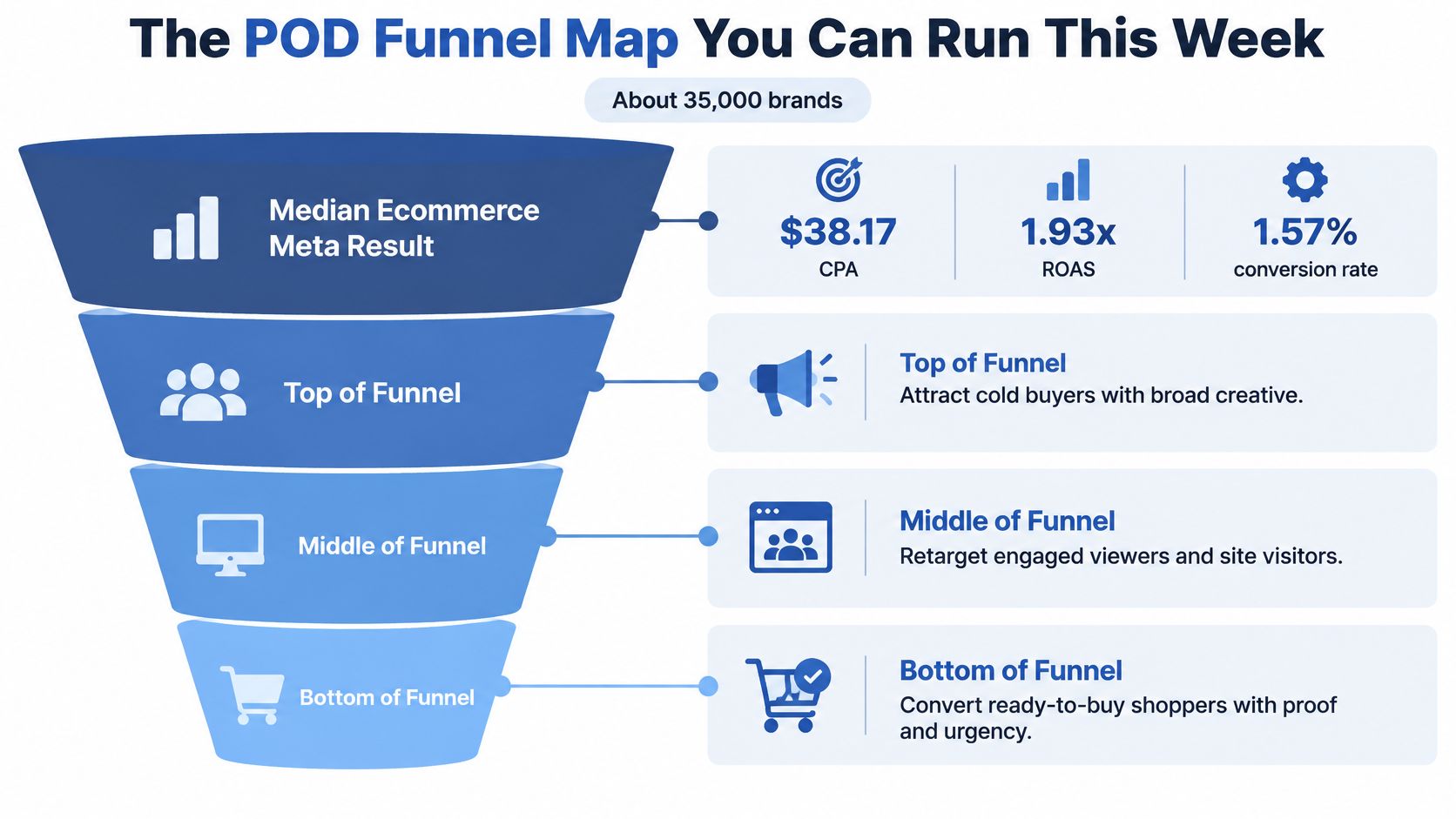
Start with the scoreboard most sellers never see. A 2025 analysis of approximately 35,000 ecommerce brands in Triple Whale data summarized by AdsUploader reported a median Meta advertising conversion rate of 1.57%, a median cost per acquisition of $38.17, and a median return on ad spend of 1.93x.
That median is not your target. It's a warning about math. A $28 to $45 tee with a 30% to 50% margin often can't absorb a $38 acquisition cost on the first order, so chasing platform ROAS without knowing your ceiling is how good designs get killed early.
Work the ceiling before you launch. Say a $35 tee leaves $18 after print and fulfillment, payment fees, and expected refunds. Any cost per purchase above $18 loses money on that first order, which means $18 is your real acquisition ceiling, not whatever Ads Manager calls a good result.
Three stages and three different jobs
Cold ads introduce a niche shirt to people who've never seen it. Warm ads follow up with video viewers, page engagers, and recent site visitors who showed interest but didn't buy. Buyer ads bring past customers back for the next design in the same niche, where trust already exists and the creative can skip the introduction.
| Stage | Audience | Budget share | Optimize for | Healthy signal |
|---|---|---|---|---|
| Cold prospecting | Broad or 1% purchaser lookalike; exclude buyers and recent site visitors | 60-70% | Purchase, or initiate checkout if under about 50 events a week | Add-to-cart and thumb-stop, not cheap clicks |
| Warm engagement | Video viewers at 50%, Facebook and Instagram engagers | 10-15% | Purchase | Landing-page views from people who already engaged |
| Hot website | View content, add to cart, and initiate checkout, 7-14 days | 10-15% | Purchase | CPA inside contribution margin after print, ship, fees, and refunds |
| Past buyers | Purchasers from the last 30-180 days, from customer list or purchase event | 5-10% | Purchase | A second order, judged apart from first-sale ROAS |
One Sales campaign for cold traffic plus a separate retargeting campaign is enough structure for most new accounts. You don't need separate ad sets for every interest, placement, and shirt color. Consolidation puts your limited budget behind fewer learning pools, and that matters more than feeling precise.
Decision rule: contribution profit after print cost, shipping, fees, and refunds is the green light. Platform ROAS is only a clue.
The rest of this plan builds those campaigns, funds them through learning, tests creative that fits apparel, and judges them on money kept. Get the map right first, and every later decision gets easier because you already know which stage failed and what healthy looks like there.
How to Build Cold Warm and Buyer Campaigns
A three-stage funnel gives a POD account enough structure to separate new prospects, engaged shoppers, and customers without scattering a small budget across crowded interest stacks. Keep the creative angles, event quality, and contribution margin under your control, then let Meta handle delivery.
The seven step build
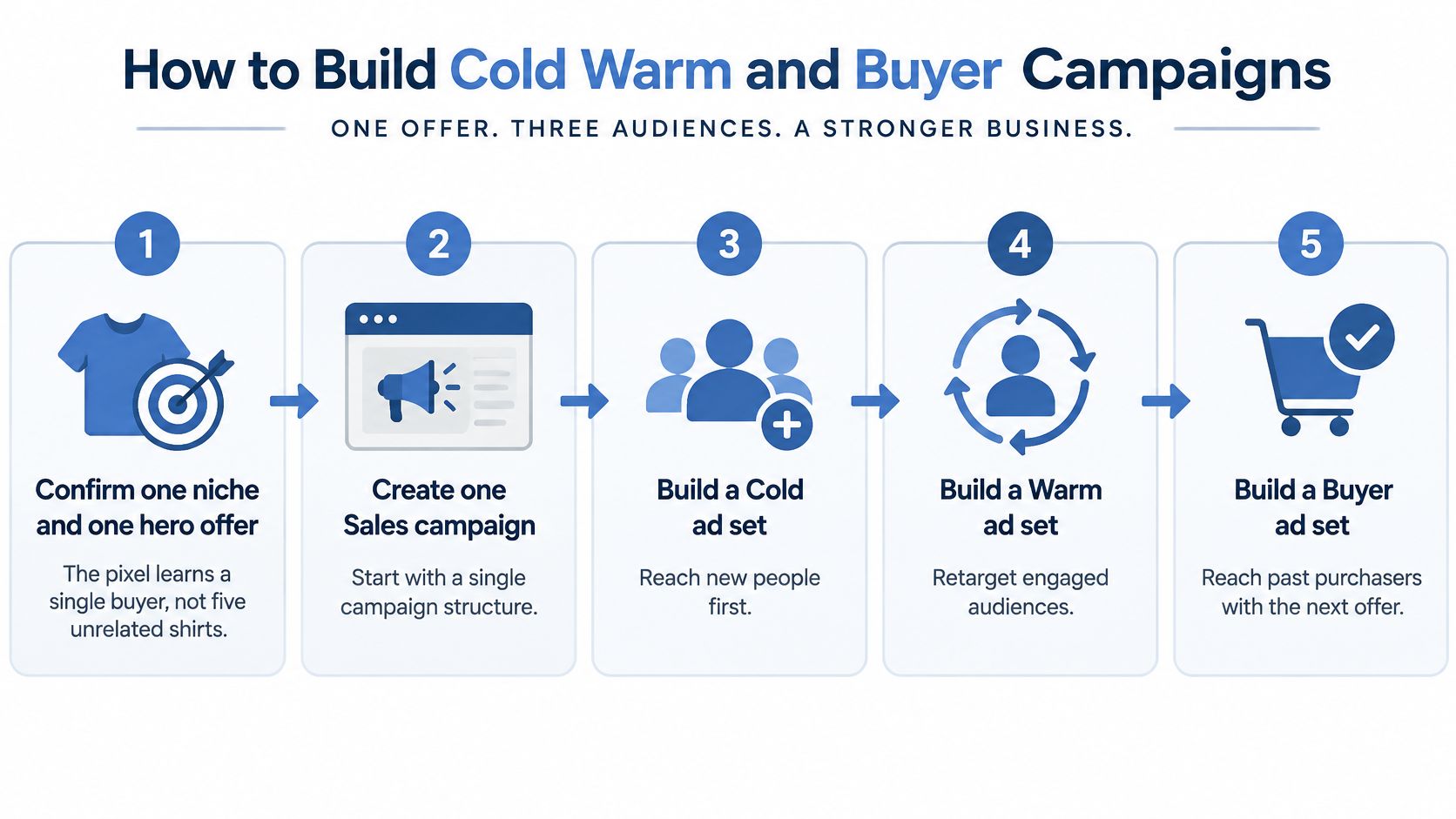
- Confirm one niche and one hero offer. Give the pixel a coherent buyer pattern to learn from. One dog breed, trade, or hometown is a clearer starting point than several unrelated shirt designs.
- Create one Sales campaign for cold prospecting. Set the budget at the ad set level. Manual campaign setup is usually better for beginners because it offers direct control over configuration and lets you test specific placements.
- Build the cold audience. Start broad by country and age, or use a 1% lookalike once you have enough relevant data. Choose a seed from your strongest purchasers or highest-value engagers, so Meta has a clear pattern to match. This guide to using Facebook lookalike audiences for print on demand offers more context on the approach.
- Build warm Custom Audiences. Include 50% video viewers, Facebook and Instagram engagers, and website visitors who have not bought. If these pools are small early on, warm up audiences before paid campaigns by creating relevant engagement before relying on retargeting for sales.
- Build hot and buyer audiences. Create separate pools for view content, add to cart, and initiate checkout over 7 to 14 days. Add a buyer pool from your customer list or purchase event over 30 to 180 days.
- Apply exclusions. Exclude buyers from cold and warm audiences, and recent site visitors from cold. This keeps prospecting focused on new people and limits retargeting spend on customers who have already purchased.
- Name everything by stage, window, and angle. Keep campaign, ad set, and ad names consistent with your UTMs. Clear naming makes it easier to trace results to the audience and creative behind them.
Meta's Custom Audiences help explains how advertisers can reach people using first-party customer data and engagement data from Meta platforms. That includes customer lists, website activity, and interactions with Facebook, Instagram, WhatsApp, and Threads content. Custom Audiences can also seed a Lookalike Audience, letting a buyer list inform cold prospecting.
Your same day launch check
- Audiences populated: Each warm and hot audience contains people, even if the pool is small.
- Exclusions active: Buyers are excluded from cold and warm, and recent visitors are excluded from cold.
- One optimization event: Each ad set optimizes for a single event, keeping its learning focused on one goal.
If all three checks pass, fund the funnel and let it gather useful signals before changing the setup.
Creative Angles Worth Testing on Apparel
Broad targeting only works when the creative does the targeting. For a shirt, that means the ad itself names the buyer before Meta has to guess.

Four angles that fit a shirt
- Identity names the niche in the first line. A breed, a team, a trade, a hometown. "For golden retriever people who plan weekends around the dog" beats a generic lifestyle headline because the right buyer self selects in one second.
- Product in use shows the print on a real person. Put the design in the setting where it gets worn, at the lake, in the shop, at the game. Fit and print size read instantly on a body and get questioned on a flat mockup.
- Proof borrows trust. A short review, a repeat buyer note, or a simple line about units moving this week answers the quality question every POD shopper asks.
- Story explains why the design exists. One honest sentence from you or a customer about the moment behind the artwork turns a graphic into a keepsake, and keepsakes sell at better prices.
Run three to five ads in the cold ad set and change one hypothesis at a time. Hook, visual, or offer, never all three, or you'll never know what worked. AvatarIQ keeps this pipeline moving by generating fresh designs and mockups, so new angles don't stall waiting on a photoshoot. Content made with AvatarIQ can also be used on Etsy, through social media, or with friends and family, and running paid ads is not required, which makes it a handy way to validate an angle before spend.
What you still control under Advantage+
Meta's automation shows real progress, not magic. Social Media Today's overview of Meta's Advantage+ reporting notes Meta reported a 9% lower average cost per action for its Advantage+ sales setup, an 11% higher average click-through rate from AI generated background variations, and a 5% median reduction in cost per result among advertisers adopting Opportunity Score recommendations. Treat those as platform reported signals worth testing, not guarantees for your account.
You still control the inputs that decide whether automation helps or hurts. The offer math, the niche, the creative angles, the exclusions, the new versus returning customer labels, and your maximum acquisition cost all stay yours. Feed Meta diverse, specific creative and clean purchase signals, and its delivery system becomes an advantage instead of a black box.
Promote an angle only when add-to-cart rate and contribution margin agree with the click-through rate. Clicks alone promote the wrong ads every time.
Tracking That Shows Real Profit
Set measurement up before the first dollar scales, not after. A funnel you can't verify is just a story Ads Manager tells you.
The setup that makes signals trustworthy
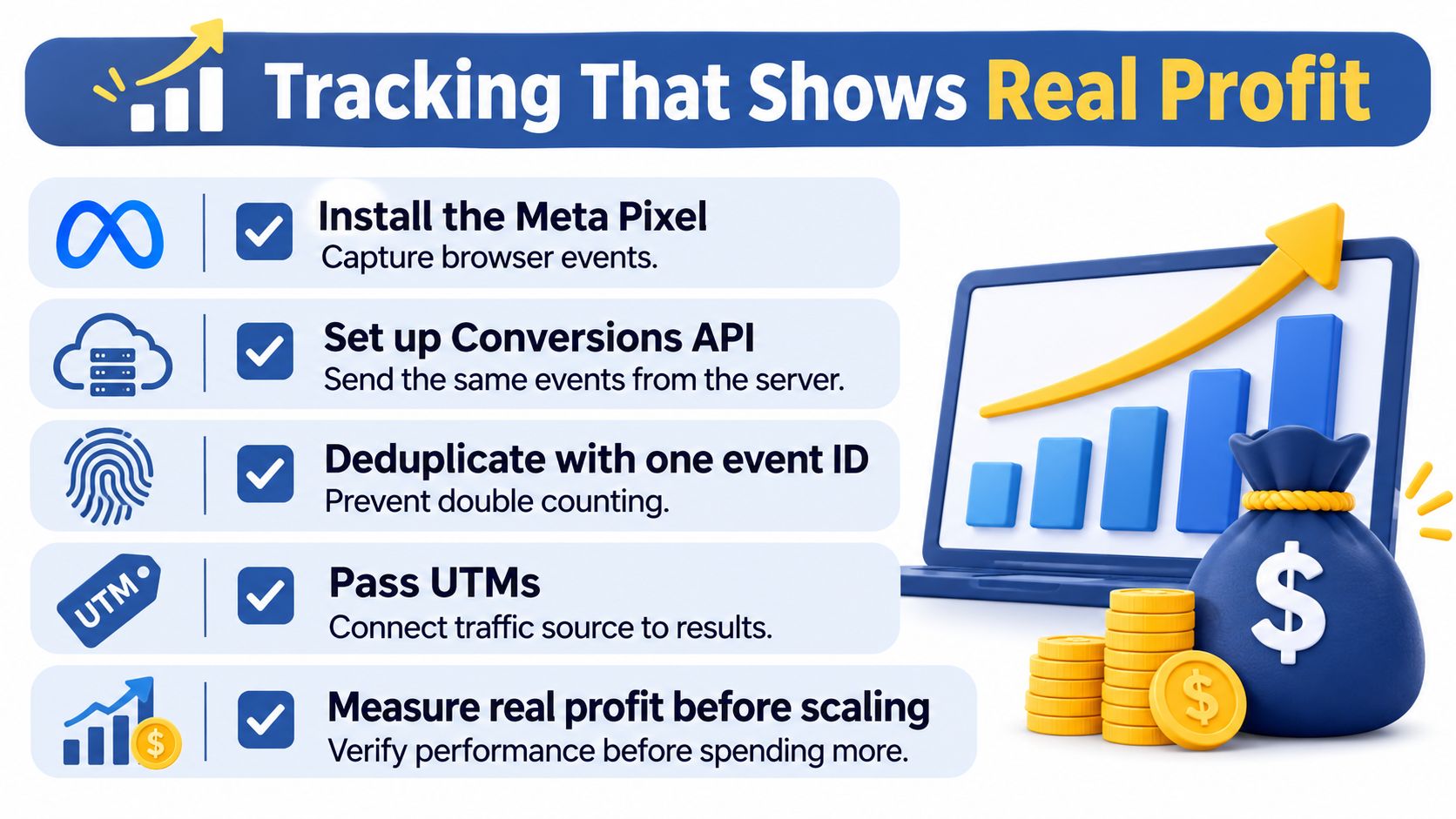
Install the Meta Pixel and the Conversions API together, send the same events from browser and server, and deduplicate them with one stable event ID. Then pass UTMs that name the campaign, the stage, the creative angle, and the offer, so every session in your store analytics carries its origin with it. If you're starting from zero, our guide on setting up the Facebook Pixel for print on demand walks through the full configuration.
Cleaner signals are worth the effort. Advertisers using Conversions API have seen meaningfully lower costs per result on average, which is a reason to fix your events early. It's a lever, not a promise, but starving Meta of purchase data while asking it to find purchasers never ends well.
The three view weekly reconcile
- Meta purchases and value for relative creative choices. Which ad beats which ad inside the same stage.
- Store analytics for sessions and orders by source, so you can compare channels on equal footing.
- Your finance ledger for money left after product cost, fulfillment, fees, refunds, and ad spend. This view decides whether you scale.
Why three views? Because platform attribution flatters itself. An ecommerce attribution analysis from Enalitica covering more than 10,000 orders found that Meta and Google together claimed conversions for every order while their reported revenue represented about three-quarters of total revenue, and Meta reported 4.6 times as many conversions as orders carrying a Meta click identifier.
That's how a retargeting campaign looks heroic while doing little. View through and multi touch credit stack up on people who were already coming back. Use Ads Manager to pick the better ad, then validate real budget increases with a holdout, a geo split, or Meta Conversion Lift where it's available.
Keep first order return separate from repeat orders in niches where buyers come back. Mixing them hides a weak first sale behind strong repeat revenue, or makes a healthy acquisition engine look slow.
Scaling rule: if reported ROAS rises and total store profit doesn't, don't scale. Increase spend only when blended contribution profit stays positive over a long enough window and the lift still looks real.
Budgets That Survive the Learning Phase
Small budgets can work, but splitting them across too many ad sets leaves each one short of the events it needs to learn. Keep the campaign structure simple and set spend according to the optimization event you can realistically generate.
Meta's explanation of the learning phase says significant changes to targeting, creative, optimization events, bids, or ad additions can restart learning. Delivery generally stabilizes after approximately 50 optimization events within seven days. That is a target, not a reason to optimize for an event that does not predict a buyer. At a purchase CPA of about $38, reaching 50 purchases in a week takes roughly $1,900 in spend. A cheaper optimization event can reach 50 sooner, but only if it signals likely purchase intent.
Match the budget to the event you can feed
| Weekly budget | Likely volume | Optimization event | Campaign shape |
|---|---|---|---|
| About $150-200 | Usually short of 50 purchases | Initiate checkout if it predicts a buyer | One Sales campaign and one or two ad sets |
| About $350-700 | About 9-18 purchases at a $38 CPA | Purchase once checkout volume is steady | Cold campaign plus one warm and hot retargeting campaign |
| About $1,000 or more | About 26 purchases at a $38 CPA | Purchase | Separate cold, warm, hot, and buyer campaigns with exclusions |
At roughly $20 to $30 a day, run one Sales campaign with one or two ad sets. Optimize for initiate checkout only when checkout activity predicts purchases in your store. Around $50 to $100 a day, a cold campaign and one combined warm and hot campaign usually keep spend concentrated. Near $150 a day and up, separate stages only when each has enough volume to support its own campaign. A budget of $1,000 a week does not buy 50 purchases at a $38 CPA.
The Facebook ad budget guide for print on demand can help you choose a starting tier rather than copying another seller's spend.
Judge each stage by its own metric
Cold creative earns attention through thumb-stop and video engagement. Site performance shows in landing-page views and add-to-cart rate. Purchase campaigns need to stay below your contribution margin ceiling. Cheap clicks with no carts are curiosity, not sales.
Give a new ad set several days without significant edits unless spend is clearly wasted. Repeated changes can restart learning and make a small budget work harder to gather stable results. Consolidate campaigns before adding another stage, and keep creative angles, event quality, and contribution margin under your control while Meta handles delivery.
Fixing a Funnel That Stalls
A stalled funnel usually breaks at one of four points. Identify the symptom, then make one targeted adjustment. Changing several things at once makes it harder to see what helped.
Spend won't deliver or barely moves
The audience may be too narrow, or the warm pool may not have enough activity to spend against. Broaden cold targeting by country and age. Let warm audiences build from engagement and site traffic before judging delivery. A small pool may need more time.
Cost per purchase sits above your ceiling
If CPA remains above your contribution margin after the learning window, review the offer first. In most cases, price, bundle, and shipping friction are a bigger lever than audience tweaks, so review those before touching targeting. Then check the landing page and add-to-cart rate. A page that loses shoppers at the cart stage can make every audience look expensive. Adjust targeting last.
Reported ROAS climbs while store profit stays flat
Retargeting may be taking credit for orders that would have happened anyway. Pause the budget increase and compare performance with a stable baseline, using a holdout or geo test if practical. If profit does not change when the campaign pauses, the campaign may not be creating the sales its reporting claims.
Learning never ends
Frequent edits keep resetting the ad set before delivery can settle. Freeze it, give it several days to collect events, and change it only when spend is clearly wasted.
Change one variable at a time and record when each adjustment happens. That makes weekly reviews more useful: you can connect a change to its effect instead of guessing. The simpler the funnel, the easier it is to spot whether the problem sits with the offer, the page, or the audience.
Scaling Tips When the Numbers Hold
When an ad set is profitable after all costs, scale it like you mean to keep it. Raise the budget by about 20% every few days instead of doubling overnight. Steady increases let delivery adjust without throwing the ad set back into unstable learning.
Duplicate a winner into a new campaign only when the original is already profitable on real contribution, not on hopeful attribution. And keep buyers excluded from cold as you grow, because scale happily buys the same person twice if you let it.
Two discipline rules protect everything else you've built. First, stay on one niche until the ads and designs feel unmistakably specific. Spreading across several niches at the start is the most common early mistake, since it makes designs generic and ads expensive. A niche you understand well produces sharper hooks, better proof, and repeat buyers who want the next design.
Second, stay on Meta until this funnel works, then add SEO, email, Instagram, or Pinterest. We recommend focusing on one traffic source until it works, then adding others, because early sales usually come from paid ads while slower channels take months to pay off. One working channel beats four half built ones.
Don't add interest stacks just to feel in control. Refresh the hook before you rebuild the account, and kill an angle that spends without producing add-to-carts rather than nursing it with smaller budgets.
A focused niche plus a patient budget is how a small apparel brand turns one shirt into a repeatable acquisition system.
Review profit three times a week, not CPM every hour. That rhythm is fast enough to catch real problems and slow enough to stop you from editing your way out of a winner.
Launch the Funnel in Seven Days
One week is enough to go from blank account to live funnel, and that speed is the beauty of print on demand. No inventory, no warehouse, just a focused offer tested in public.
- Day 1: pick one niche and one hero offer, then confirm the Pixel, Conversions API, and UTM naming.
- Day 2: build the cold Sales campaign and the warm and hot retargeting campaign with exclusions in place.
- Day 3: load three to five creative angles, using AvatarIQ to design fresh mockups for the angles that don't exist yet.
- Day 4: set the budget from the tier that matches your current volume and select one optimization event.
- Day 5: check that every audience has people in it and your three reporting views line up.
- Day 6: let learning run and make no edits.
- Day 7: review contribution profit, not ROAS, and decide whether any increase is earned.
The full ad setup walkthrough lives in the Apparel Cloning training, with additional guidance at skup.net/facebook-hub/monitoring-your-ads, and sellers ready to push higher volume with paid ads can connect with our team at skup.net/call. A focused beginner can own a real brand here, test designs in the open, and let one simple funnel pay for the next design, then the next. That's an exciting place to start.
Ready to turn this map into live campaigns with step by step guidance built for POD apparel? Visit Skup to explore the training, tools, and coaching that help beginners launch focused brands and grow them with confident, profitable Facebook ads.