Apparel Inventory Management: POD vs Traditional Guide
Global apparel stores commonly operate with item-level inventory accuracy of just 55% to 80%, according to a 2025 RFID Journal analysis. A product showing as available on a screen isn't necessarily ready to ship. That gap matters whether you own a warehouse or sell print-on-demand apparel from your laptop.
Apparel inventory management means knowing what you can sell, what customers want, and what your fulfillment partners can deliver. Print on demand makes starting simpler because you don't need to buy finished garments in advance. Your job is to build a reliable connection between customer demand and supplier availability.
Table of Contents
- POD and Traditional Inventory Side by Side
- How the Inventory Workflow Runs From Tracking to Reorders
- Tracking Sizes and Why Stockouts Cost More
- Handling Returns and Excess Stock Without Losing Margin
- Inventory KPIs Worth Tracking Every Week
- A Beginner Playbook for POD Inventory Control
- Build Your Inventory System This Week
POD and Traditional Inventory Side by Side
The biggest difference is when you commit cash to finished stock. Traditional sellers purchase garments before customers buy them. Print-on-demand sellers arrange production after an order comes in.
Both models require tracking each sellable variation. A navy medium with one design isn't interchangeable with a navy medium carrying another design, even when both use the same blank shirt.
POD vs traditional apparel inventory
| Factor | Traditional inventory | Print on demand (POD) |
|---|---|---|
| Who holds finished stock | Brand or retailer, in its own warehouse | Supplier produces the item after the order |
| Upfront cash | Large purchase orders paid before sales | Little or none for finished stock; cost paid per order |
| Main risk | Unsold stock and markdowns | Blank availability, supplier delays and weak design demand |
| Tracking unit | Style, size and color on hand | Design, size and color plus supplier stock |
| Reorder trigger | Stock falls to the reorder point | Sales velocity and supplier capacity |
| Cost of a stockout | Lost sale and possible substitution | Lost sale and possible order cancellation |
| Returns | Restock or mark down | Often not resalable, so refund or replace decisions matter |
Read the table as a choice between different operating responsibilities, not a contest with a universal winner. Holding finished stock gives you direct control over packing and dispatch, but you commit money before demand is certain. POD lets you test demand without making that finished-stock commitment.
Where the exposure moves
Traditional sellers need to know where garments sit, how many remain, and whether another purchase order will arrive before they sell out. POD sellers need to know which blanks are available, whether the supplier can print them promptly, and whether the delivery promise remains realistic.
There's still a cash-flow consideration with POD. You may need to pay the fulfillment provider before your storefront releases the customer's payment, so keep a working-capital buffer rather than treating per-order production as cost-free.
The scale of overproduction explains why this distinction matters: the global fashion industry generated an estimated 2.5 billion to 5 billion excess items in 2023, representing approximately $70 billion to $140 billion in potential sales value, according to McKinsey's State of Fashion 2025.
Practical rule: Commit production to demonstrated demand wherever your business model allows it.
For a beginner, POD removes the need to rent a warehouse and place a large opening order. That's an encouraging advantage: you can spend your early effort learning which products customers want while maintaining a supplier-aware control system.
How the Inventory Workflow Runs From Tracking to Reorders
Inventory works like a library catalogue: the record has value only when it matches what can be supplied. Your storefront needs that same agreement between product entries, order status and what the supplier can fulfill.
The physical version of that repeating loop looks like this:
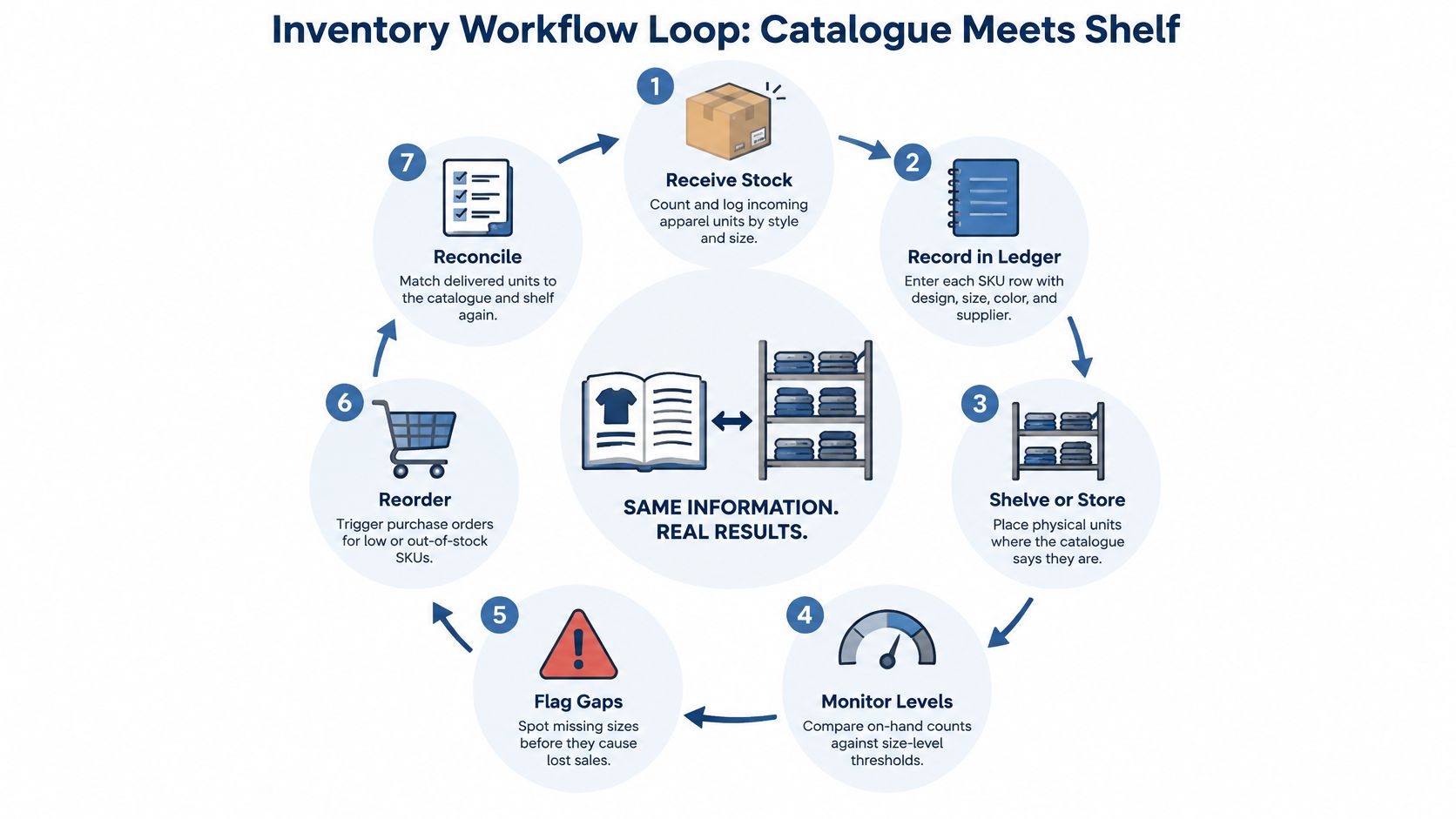
Keep every movement accountable
Create a unique SKU for each variation. A stock keeping unit identifies a particular design, garment, size and color combination. Keep the naming pattern consistent so reports don't split the same product across duplicate records.
Record movements when they happen. Capture receipts, reservations, dispatches and adjustments for stocked goods. For POD, record supplier acceptance, production status and shipment confirmation so an order doesn't disappear between systems.
Reconcile orders daily. Match storefront orders with supplier records and investigate missing acknowledgments, duplicate submissions and incorrect variants. Resolving an exception while the order is active gives you more options than discovering it after a customer complains.
Forecast demand using a recent sales window. A practical starting routine is to examine the last two to four weeks, then adjust for seasonal peaks and planned promotions. Separate sales made while a variant was available from periods when customers couldn't buy it.
Apply the appropriate replenishment rule. For traditional stock, trigger a reorder when available inventory reaches expected demand during supplier lead time plus your safety buffer. For POD, confirm additional production capacity, route to an approved alternative or pause an affected listing.
Log returns with reason codes. Record fit, production defect, transit damage and other causes separately. Those labels help you distinguish a purchasing problem from a listing or supplier problem.
Connect the operating systems. Keep the store, supplier and accounting tools aligned around matching order IDs and SKUs. Our guide to supply chain management in eCommerce explains the wider coordination behind that connection.
Why reconciliation deserves attention
An ECR Retail Loss report found approximately 60% of analyzed inventory records were inaccurate at a given point, and correcting records was associated with 4% to 8% sales growth. The practical lesson is to verify availability rather than assume a software count is correct.
Deadline-driven goods make the same point plainly: if you were ordering stoles in bulk for a ceremony, the purchase would need to be scheduled backward from the event date rather than left to a routine stock check. Supplier capacity, production time and delivery all become part of the same inventory decision.
Try this today: choose any SKU and give yourself one minute to identify its current availability, outstanding orders and fulfillment status. Any unanswered question identifies a field or connection worth fixing.
Tracking Sizes and Why Stockouts Cost More
A shirt can look well stocked at the product level while its most popular size is unavailable. Customers don't buy a style total. They buy the particular garment that fits them.
That's why apparel inventory management needs variant-level visibility, not just a count beside the product name.

A study of men's footwear published in Manufacturing & Service Operations Management, using roughly 1.5 million sales and inventory records from 217 stores, found 51.7% of unmet demand for an out-of-stock SKU shifted to adjacent sizes when available, with 25.1% moving larger and 26.6% moving smaller. Customers' responses to missing sizes therefore deserve attention alongside the missing units themselves.
That finding doesn't mean you should encourage customers to accept the wrong fit. A purchase that becomes uncomfortable after delivery can turn into a return rather than a retained sale.
Protect the variants customers want
- Measure demand separately. Review orders and unavailable selling days for each size and color. Don't interpret weak sales during a stockout as proof that customers dislike the variant.
- Prioritize profitable availability. Focus supplier checks on variants with healthy contribution margins and customers who are unlikely to accept an alternative.
- Approve backup production. For proven designs, verify another supplier's garment measurements, print placement, color options and shipping service before you need them.
- Check before buying traffic. Confirm blank availability and production capacity before a promotion. Don't increase ad spend against a listing whose key sizes repeatedly disappear.
Size guidance helps customers choose the right available option rather than guessing. For event apparel, Graduation Attire's guide to find your cap and gown size illustrates the value of giving buyers garment-specific sizing information.
Separate availability from fit
Say your navy shirt keeps selling in medium, while the same design in another color barely moves. Before removing the slower color, check whether its popular sizes were available for purchase and whether the listing clearly showed the garment's measurements.
Watch variant-level fill rate, stock-related cancellation rate and lost-sales incidents together. Record explicit customer requests for unavailable options as lost-sales signals, but don't label every abandoned cart a stockout.
You don't need a large stockpile of every option to protect sales. You need a clear view of the combinations customers choose and a dependable way to fulfill them.
Handling Returns and Excess Stock Without Losing Margin
Replacing every returned item can feel generous, but it isn't always the most helpful response. A customer who no longer needs the garment may prefer a refund, while someone facing an event deadline may need an immediate alternative.
Treat a return as both a customer-service decision and an inventory transaction. Record the refund, replacement production, shipping expense and final destination of the original garment.
Return response by situation
| Situation | Best response | Why it works |
|---|---|---|
| Fit problem on a popular size | Improve size guidance and offer an exchange | Keeps the sale and lowers repeat returns |
| Production defect | Replace from a backup supplier and log the supplier | Protects reviews and exposes supplier quality issues |
| Damaged in transit | Carrier claim and replacement or refund | Can recover cost without repeating the loss |
| Unused, resellable item | Refund and return the stock to the ledger | Recovers inventory for future sales |
| Personalized item that cannot be resold | Targeted or partial refund where appropriate | Limits waste and cost compared with a full replacement |
| Design with repeated returns above your threshold | Pause or discontinue the listing | Stops losses from compounding |
Use these responses within your published policy and applicable consumer rights. A partial refund should be an appropriate, agreed resolution, not a substitute for a remedy the customer is legally entitled to receive.
Inspect before making stock available
A returned garment isn't available inventory until someone checks its condition. Inspect the print, fabric, labels and packaging, then assign a status such as resellable, repairable, donation candidate or unsuitable for reuse.
For personalized items, focus on resolving the customer's problem without producing another item unnecessarily. A replacement can preserve goodwill, but another production and shipping cycle adds cost and potential emissions compared with a suitable refund.
Resolve the cause, not just the complaint. Replacing a shirt with the same sizing problem creates another disappointed customer.
Our guide to handling print-on-demand returns provides more detail on building a consistent response process.
Make responsible disposition part of the decision
Regulation is another reason to document what happens to unsold garments: The Business of Fashion's State of Fashion coverage described EU Ecodesign reporting duties on unsold textiles from 2025 and a planned prohibition on destroying unsold products in early 2026. Treat that report as planning context, and verify current applicability before making a compliance decision.
For excess stocked goods, compare the likely recovery from resale or markdowns with handling costs. Where resale isn't sensible, assess suitable donation or textile-recovery routes and document the outcome rather than letting unclassified returns accumulate.
Inventory KPIs Worth Tracking Every Week
Weekly apparel inventory KPIs
| KPI | How to calculate | What it tells you |
|---|---|---|
| Inventory accuracy | Audited SKU records matching physical or supplier stock, divided by audited records, times 100 | Whether stock data can be trusted |
| Stockout rate by size | Selling days with a size unavailable, divided by total selling days, times 100 | Where demand goes unmet |
| Fill rate | Units shipped on time, divided by units ordered, times 100 | Supplier and fulfillment reliability |
| Cancellation rate | Orders cancelled for stock reasons, divided by total orders, times 100 | Hidden availability problems |
| Return rate by design | Returned units, divided by units sold for each design, times 100 | Fit, quality and listing accuracy |
| Sell-through rate | Units sold, divided by units available over the period, times 100 | Which designs deserve more production |
Keep the definitions stable. For example, define “on time” against the promised dispatch date, and calculate return rates against the original sales cohort when possible so delayed returns don't distort your interpretation.
Sell-through requires special care with POD. It's useful for finished stock or a defined allocation of blanks, but an open-ended supplier catalog doesn't provide a meaningful units-available denominator. Mark it not applicable when you don't have a defined inventory pool, rather than inventing a percentage.
Read the numbers together
Strong sell-through alongside frequent fit returns suggests customers want the design but need better garment guidance or a different blank. Healthy sales with weak fill rate suggests you should fix fulfillment before expanding promotion.
A rising stock-related cancellation rate can reveal supplier trouble before it becomes obvious in shipment reporting. Cancelled orders may disappear from a shipping-only dashboard, which is why the denominator must include the original orders.
Use your first 30 days as an initial baseline, then revise targets as more orders mature through delivery and returns. Keep KPI records alongside the SKU ledger, with consistent reporting periods and notes about promotions or supplier changes.
Add a profitability check
Calculate contribution margin per design by subtracting product cost, shipping, platform fees and expected return costs from revenue. Deduct advertising costs too when deciding whether paid promotion is profitable.
Our guide to analytics for eCommerce can help connect these operating measures with commercial decisions.
Use the combined view to choose an action:
- Keep a steady, profitable design with dependable fulfillment.
- Fix a listing with clear demand but avoidable fit or delivery problems.
- Scale only after current availability, recent fulfillment and mature return results support expansion.
- Pause when unresolved supplier or margin problems make another sale difficult to serve well.
Before a bigger promotion, check the latest completed week's operating results and the older sales cohort whose returns have had time to arrive. A sales spike alone isn't enough evidence to scale.
A Beginner Playbook for POD Inventory Control
Start with a spreadsheet, not a complicated software project. Create a master variant record, then connect order-level entries using the SKU and order ID so multiple customer purchases don't overwrite each other.
SKU ledger template fields
| Field | Example entry | Why it matters |
|---|---|---|
| SKU | APP-TEE-NAVY-M | One unique code per design, size and color |
| Design name | Desert Sunrise | Links sales and returns to the creative |
| Supplier | Supplier A (backup: Supplier B) | Shows where routing can switch when delays hit |
| Blank availability | In stock, low or out | Predicts production delays before they happen |
| Order and ship dates | Ordered 2 March, shipped 5 March | Measures the delivery promise |
| Cancellations | Stock-related cancellation logged against order ID | Flags stock problems early |
| Return reason | Fit, defect or transit | Guides the size chart fix or supplier action |
These entries are illustrative. If you add another design to the same navy medium blank, assign a different SKU or include a unique design identifier so the records remain distinct.
The setup checklist below combines physical-stock controls with the POD approach. For a no-finished-stock business, interpret replenishment thresholds as supplier availability alerts rather than instructions to buy garments in advance.
Pair each beginner mistake with a control
Confirm the backup before launch. Don't assume another printer offers an equivalent garment. Order a sample, compare measurements and print quality, and record which customer regions the alternative can serve.
Check the exact blank variation. A supplier's style-level availability doesn't confirm your selected size and color. Record the check date and treat stale availability information as something to verify, not a guarantee.
Match the order trail daily. Filter for paid orders without supplier acknowledgment, accepted orders without production progress and shipped orders without tracking. Give each exception a named owner and a next action.
Set intervention rules early. Use your first month to establish provisional fill-rate and stock-cancellation targets, then pause affected variants when performance misses them. In Gelato, a connected store set to Manual Approval leaves orders in Pending Approval until you approve them; switching to automatic fulfillment stops that approval hold, but you should still review exceptions.
Turn return reasons into changes. Repeated fit complaints should trigger a measurement and size-chart review. Repeated defects should trigger supplier investigation, not another identical replacement process.
Keep the catalog manageable until results justify expansion. Assess conversion rate, contribution margin, refund rate, delivery time and repeat purchase before adding complexity. Set the minimum acceptable bar before testing so enthusiasm doesn't replace a decision rule.
Scale evidence rather than listing count
The Miebach Fashion 2025 study reports advanced planning tools being used to reduce inventory by 5% to 15% and improve stockout performance by 15% to 25%. For a beginner, the useful principle is coordinated planning, not buying complex technology immediately.
There's no universal order count that proves a design is ready to scale. Look for demand across comparable selling periods, enough completed deliveries to assess service, and return outcomes that support the margin calculation.
Before expanding: Write down what would make you stop, repair or increase the test.
POD gives you room to learn without committing to finished-stock purchases. A small, well-observed catalog turns that flexibility into useful business information.
Build Your Inventory System This Week
Before next Monday, complete a small operating setup you can maintain. Don't postpone it until you have a bigger catalog or a busier store.
- By midweek, create the SKU ledger. Enter your active variants, connect each to its supplier and flag any missing information. Add separate order records so you can trace each purchase through fulfillment.
- Before the weekend, confirm a backup supplier for your best design. Verify the garment, print requirements, shipping coverage and approval process. Record any differences that would require customer communication.
- Before Monday, schedule your weekly review. Use the six KPI definitions, noting where a measure isn't applicable to your POD setup. Assign a review time and decide who handles exceptions.
Keep creative work and operational control connected
Our AvatarIQ software was created specifically for print-on-demand apparel and jewelry businesses, and those are the businesses we recommend starting with. It supports stores with one product or 10,000 products, so beginners and established sellers can use the same creative system as their catalogs grow.
For readers who want structured education, the Apparel Cloning System includes AvatarIQ free for the first three months, followed by a paid monthly subscription unless cancelled. Keep the distinction clear: creative software helps you produce designs and store assets, while your ledger and supplier checks govern what you can reliably fulfill.
Make consistency the next milestone
You don't need a perfect forecast to begin. You need a repeatable way to check availability, identify exceptions and decide what to improve before the next promotion.
That's an achievable starting point for a new eCommerce business. Build the habit this week, keep the records honest, and let fulfilled orders and customer feedback guide your next move. Consistent inventory control helps turn a promising POD test into a business you can operate with confidence.
Skup offers the Apparel Cloning System and AvatarIQ to help you learn POD apparel selling and create designs and store assets. Visit Skup to explore those options while you build the supplier checks, SKU records and weekly review habits that support dependable fulfillment.