How to Know When to Kill a Facebook Ad for Print on Demand (2026)
Quick Answer
Kill a Facebook ad when it has spent 2-3x your product’s profit margin without a sale. For example, if you make $15 profit per shirt, cut the ad after $30-45 spend with no conversions. Don’t wait for “more data” — wasted ad spend is the number one beginner mistake in print on demand.
The Real Cost of Waiting Too Long
Here’s what most beginners do: they launch an ad, watch it spend $10… $20… $50… and convince themselves it just needs more time. “Facebook is still learning,” they tell themselves. Meanwhile, their credit card bill grows and their confidence shrinks.
The truth? Most losing ads show signs within the first 24-48 hours. You don’t need $200 of data to know something isn’t working.

The Skup rule: Your ad budget for testing should be 2-3x your profit margin per product. If you profit $15 on a hoodie, give the ad $30-45 to prove itself. After that? Cut it and move on.
The 4 Kill Signals (In Order of Urgency)
1. High Spend, Zero Add-to-Carts
If you’ve spent your testing budget and have zero add-to-carts, kill it immediately. People aren’t even considering your product. This usually means:
- Your design doesn’t resonate with the audience
- Your targeting is completely off
- Your ad creative isn’t stopping the scroll
2. Add-to-Carts But No Purchases
This is trickier. People are interested but not buying. Before killing, check:
- Is your price too high for the perceived value?
- Are shipping costs scaring people away?
- Does your checkout process have friction?
If the metrics don’t improve after one more day at half budget, kill it.
3. CTR Below 1%
Click-through rate below 1% means your ad isn’t compelling enough to earn a click. The creative, copy, or offer isn’t working. Kill and redesign.
4. CPM Skyrocketing
If your cost per 1,000 impressions suddenly doubles or triples, Facebook is telling you the audience isn’t engaging. Either your targeting is exhausted or the creative is fatiguing. Time to kill and iterate.
What the Successful Students Do Differently
Adam Schneider didn’t hit $500K in sales by nursing losing ads. He tested fast, killed fast, and scaled winners aggressively. The difference between students who struggle and students who succeed often comes down to emotional detachment from their ads.
Judy Padgett made her first sale after 4 ad campaign tests — not by letting one campaign run forever, but by quickly iterating through different approaches until one clicked.
Frank Lacy’s path to $10K in sales came from the same discipline: test, evaluate, kill or scale. No sentiment. Just data.
The “Let It Run” Trap
Beginners often fall for these myths:
“Facebook needs time to optimize” — True for scaling, not for initial testing. If no one’s buying after your testing budget, more time won’t help.
“I just need a bigger sample size” — You need engagement signals, not more impressions. 1,000 impressions with zero clicks is enough data.
“My product is great, the audience just hasn’t found it” — If you’ve tested multiple audiences with the same result, the product or creative needs to change.
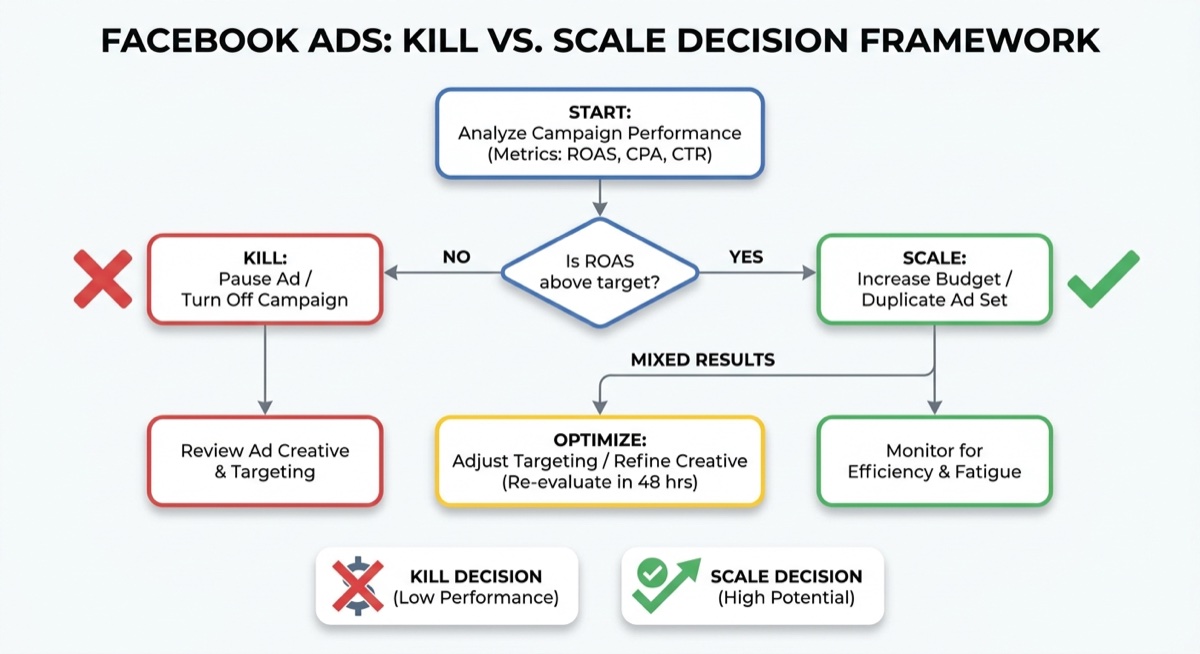
A Simple Kill/Scale Framework
After spending your testing budget (2-3x profit margin), use this decision tree:
No add-to-carts? Kill immediately. Test new creative or audience.
Add-to-carts but no sales? Cut budget in half, run one more day. Still no sales? Kill.
Sales but not profitable? Analyze metrics. If CTR and conversion rate are decent, try refining targeting. If not, kill.
Profitable? Don’t touch it. Start scaling slowly (20% budget increase per day).

Common Mistakes When Killing Ads
- Killing too early: Don’t panic at $5 spend with no sales. Give your testing budget time to work.
- Killing during learning phase: Wait until “Learning” status completes before judging results.
- Not documenting why: Keep notes on why each ad failed. Patterns emerge that save money later.
- Emotional attachment: You love your design. The market doesn’t care. Kill it anyway.
- Killing winners too early: A profitable ad having one bad day isn’t a kill signal. Look at 3-day averages.
FAQ
How much should I spend before killing a Facebook ad?
Spend 2-3x your product’s profit margin before making a kill decision. If you make $15 per sale, test with $30-45 per ad set before cutting.
Should I kill an ad that’s getting clicks but no sales?
Clicks without add-to-carts mean people are curious but not interested enough to buy. After your testing budget, kill it. Clicks with add-to-carts but no purchases might indicate a checkout or pricing issue — investigate before killing.
Can I revive a killed ad later?
You can test the same design with different creative, copy, or targeting. But don’t relaunch the exact same ad expecting different results. Change at least one major variable.
The Bottom Line
Killing ads feels like failure, but it’s actually the path to success. Every killed ad teaches you something about your audience, your creative, or your offer. The faster you kill losers, the faster you find winners.
Students in the Skup Incubator learn this discipline from day one. It’s not about running more ads — it’s about running smarter tests and cutting losses quickly. That’s how beginners go from struggling to profitable in weeks instead of months.