Home » Blog » eBay Shopify Integration A Guide to Scaling Your POD Business
Hooking up your Shopify store with the massive eBay marketplace is a classic multi-channel play, and it's an incredibly exciting opportunity for growth. It’s all about managing your products, inventory, and orders from one spot instead of frantically jumping between two different systems. For a print-on-demand business, this is a total game-changer. You’re essentially combining Shopify’s brand-building muscle with eBay’s colossal, built-in audience to seriously ramp up your sales without doubling your workload.
Why eBay and Shopify Are Better Together
Relying on just one platform is like fishing in a small pond when there’s a giant ocean right next door.
When you link Shopify and eBay, you’re building a much more resilient and profitable business. You get to capture customers from two completely different worlds, but both are incredibly valuable. This isn't just about selling more stuff; it's about building a smarter, more diversified operation that opens up incredible new possibilities.
This powerful duo gives you a direct line to a huge, ready-made audience. Just think about it—you get instant access to eBay's customer base without spending an extra dime on ads to find them. This is a massive leap forward for any eCom entrepreneur.
The Strategic Advantage of Going Multi-Channel
Expanding your reach is the most obvious win here, but the real magic is in how the two platforms work together. You can play to the strengths of both to build a print-on-demand powerhouse.
Here's why this setup gets entrepreneurs so excited:
Massive Customer Access: eBay instantly puts your products in front of over 135 million active buyers. These aren't just browsers; they're people actively searching for things to buy. That's a firehose of traffic you don't have to pay for.
Higher Profit Margins: You can use Shopify as your main brand hub. It's where you control the entire customer experience and, more importantly, keep higher profit margins on your direct sales.
Brand Building and Trust: Your Shopify store is your brand's home. It’s where you can build a loyal community and develop direct relationships with customers, something that’s much tougher to do on a crowded marketplace.
Now, things got interesting when Shopify pulled its native eBay app back in early 2023. At first, it seemed like a step back, but it was actually a blessing in disguise. That move kicked the door wide open for more powerful third-party apps to step in, offering way more advanced features and flexibility. Honestly, there’s never been a better time to connect these two platforms.
If you’re curious about the state of play, we break down why eBay is still such a solid channel in our guide on whether you can dropship on eBay.
This shift toward specialized apps is a huge win for sellers. Instead of being stuck with a one-size-fits-all tool, you can now pick an integration that's perfectly suited to your business, whether you're just getting started or scaling up to six figures.
Choosing Your Integration App
With Shopify's old native app retired, the door has swung wide open for a new breed of powerful, third-party integration apps. This is actually fantastic news, especially for print-on-demand sellers. Why? Because you now have tools built from the ground up to tackle the unique opportunities of multi-channel selling.
Making the right choice here is all about matching an app's capabilities to your current business reality and where you see it going in a year or two. Don't just grab the first one you see. The key is finding a tool that goes beyond just pushing products to eBay—the real magic is in the automation that buys back your time and prevents those costly inventory mistakes.
Key Features to Prioritize
The best integration tools aren't just simple connectors; they're command centers for your entire multi-channel operation. You need an app that feels less like a utility and more like a partner, handling the grunt work so you can focus on designing and marketing.
Here are the absolute non-negotiables to look for:
Real-Time Inventory Syncing: This is priority number one, period. When a t-shirt sells on your Shopify store, its stock count needs to update on eBay instantly, and vice versa. This single feature prevents you from overselling and torpedoing your seller reputation on both platforms.
Centralized Order Management: A solid app will pull all your eBay orders directly into the Shopify dashboard you already know. This lets you manage everything from one screen, which is a massive time-saver when you're sending orders to your POD provider. No more jumping between tabs.
Bulk Listing and Management: Manually listing hundreds of products with different sizes and colors can feel overwhelming. Look for tools that let you build listing templates and push your entire Shopify catalog—or just specific collections—to eBay in a few clicks.
Comparing Top eBay Shopify Integration Apps
While a ton of apps are out there, a few tend to float to the top for their reliability and deep feature sets. We're going to break down two of the most popular choices so you can see how they stack up for a POD business like yours.
Comparing Top eBay Shopify Integration Apps
Deciding on an integration app often comes down to weighing specialization against versatility and comparing pricing models. Let's look at two of the biggest players.
An all-in-one connector for multiple marketplaces.
Specialized tools often have deeper, more nuanced features for eBay's specific rules and quirks.
Pricing Model
Tiered monthly fee based on order volume.
Free for your first 50 marketplace orders, then a 1% fee on orders after that.
A fixed monthly fee can be more predictable as you scale. A percentage-based fee is great for getting started with lower initial costs.
Ease of Use
Generally considered user-friendly with strong customer support.
Seamless integration, since it's an official Shopify-built app.
You want an intuitive interface that doesn't feel like you need a degree in computer science to get your first products listed.
Key Advantage
Advanced features like managing multiple eBay accounts.
Connects to other major players like Amazon and Walmart.
If you have plans to expand beyond eBay, an all-in-one solution could be a smarter long-term move.
Choosing the right app is about balancing your immediate needs with your future ambitions. Do you want to go deep on eBay, or do you see yourself selling across multiple channels down the road?
Finding the right app is about matching its strengths to your business goals. For a deeper dive into tools that can boost your sales, check out our guide on the best Shopify apps to increase sales.
At the end of the day, there's no single "best" app for everyone. It's about finding the right one for your budget, your technical comfort level, and your growth plans. Always start with a free plan or trial period to run a few test listings and orders. That hands-on experience is the only way to know for sure if an app will truly support your business instead of just adding another layer of complexity.
Building a Solid Foundation for Integration
Alright, you’ve picked your integration app. Now the real fun begins—building the engine that will power your multi-channel sales.
Getting this initial setup right is non-negotiable. Seriously. Taking the time to lay a solid groundwork from day one will save you from a world of headaches down the road and get you ready to scale.
Your first move is to get your Shopify products ready for their eBay debut. This isn’t about a simple copy-and-paste job. It’s about thinking like an eBay buyer and tailoring your listings with the exact keywords they’re punching into the search bar.
Prepare Your Products to Win on eBay
Before a single product gets synced, it needs a makeover. eBay is a crowded, visual-first marketplace. That plain t-shirt with a barebones description? It’s going to get lost in the noise. Your designs and mockups are your best salespeople here.
This is where a professional touch gives you a massive leg up. A tool like AvatarIQ can be a game-changer, letting you generate stunning, AI-powered designs and create hyper-realistic mockups in minutes. Think about it: you can showcase your apparel on professional models without ever booking a photo shoot. That kind of presentation instantly elevates your listings, making them pop and building trust before a customer even reads a word.
Success on eBay starts with presentation. High-quality, eye-catching designs and mockups aren’t just a nice-to-have; they are essential for grabbing attention and driving clicks in a crowded marketplace.
Connect and Configure Your Integration
Once your products look the part, it’s time to fire up your chosen app and dive into the settings. This usually involves authorizing the app to access both your Shopify and eBay accounts, which creates the secure handshake between them.
A crucial step here is mapping your product collections. You have to tell the app how your Shopify categories translate to eBay's massive structure. For example, your "Men's Graphic Tees" collection in Shopify needs to be pointed to eBay's "Clothing, Shoes & Accessories > Men > Men's Clothing > T-Shirts" category. If you're managing a lot of products, applying principles of effective product feed management for Shopify SEO can make this process way more efficient.
Establish Your eBay Business Policies
Finally, you need to set up your business policies directly within your eBay account. These are the house rules for your eBay operation and a requirement for every single listing. They build buyer confidence and cover three key areas:
Payment Policy: This is straightforward, as it’s typically handled through eBay Managed Payments.
Shipping Policy: Define your handling times, the shipping services you offer, and any costs. Be realistic, but remember that fast and free shipping is a huge magnet for eBay buyers.
Return Policy: Outline your rules for returns, including the timeframe and who foots the bill for return shipping.
Getting these policies set up clearly and fairly doesn't just check a box for eBay—it gives buyers the confidence to click "Buy It Now." A well-defined foundation, from your product images to your store policies, is the key to unlocking the full potential of your eBay Shopify integration. This setup is also vital if you plan to use one of the best Shopify themes for dropshipping, as it ensures a consistent brand experience across channels.
Nailing Your Multi-Channel Workflow
Once your foundation is solid, it's time to dial in the day-to-day operations. This is where you move beyond just connecting the platforms and start building a truly automated business machine.
The whole point of a rock-solid eBay Shopify integration isn’t just to get your products listed in two places. It’s about creating one unified system. A sale pops up on eBay? It should instantly appear in Shopify. An item sells on Shopify? The stock count on eBay needs to drop immediately. It's this real-time dance that prevents the dreaded oversell—one of the fastest ways to tank your seller reputation.
The Magic of Automated Syncing
At the heart of it all is automated synchronization. Think of your integration app as the central nervous system for your inventory, orders, and pricing, making sure both storefronts are always telling the same story. Without it, you’re stuck manually tweaking stock levels after every single sale, which is a one-way ticket to burnout and costly mistakes.
This is a complete game-changer, especially for print-on-demand businesses. This model offers incredible flexibility and allows you to offer a wide range of products without upfront inventory costs. When paired with multi-channel selling, its potential is truly unlocked. eBay offers a massive, ready-made audience of 134 million active buyers. Tapping into that traffic without spending a dime on ads, while managing everything from your familiar Shopify dashboard, is the ultimate win. You can learn more about these kinds of multi-channel strategies on shopplaza.io.
Centralize Your Order Fulfillment
One of the biggest payoffs of a proper integration is creating a single source of truth for all your orders. Gone are the days of logging into eBay, checking for sales, then copy-pasting customer details over to your POD supplier. It's exhausting just thinking about it.
Instead, your new, streamlined workflow should look something like this:
An eBay sale is automatically pulled into your Shopify "Orders" tab. It’ll even get tagged so you know exactly where it came from.
It sits right there alongside your direct Shopify sales, giving you a complete, at-a-glance view of your business from one screen.
You then process that order with your print-on-demand partner directly from Shopify, just like you would any other sale. No platform-hopping required.
Once you’ve got your main integration app running, the next step is perfecting how you manage stock across both channels. For anyone looking to seriously scale, checking out the best inventory management software for Shopify is a logical next step.
This is the gold standard: being able to fulfill an eBay order from start to finish without ever having to log into your eBay account. That’s the kind of efficiency that lets you scale your sales without scaling your workload.
This is what separates the sellers who thrive from those who get bogged down in manual tasks. You're not just running two stores; you're running one cohesive, automated machine. That frees you up to do what you do best: create amazing new products and grow your brand.
Turning Your Integration into a Profit Machine
Okay, you've done the hard part. The integration is live, and your products are ready to go. Now, it's time to shift gears from just setting things up to actually making this new channel work for you. This is where you start fine-tuning the operation, turning your two-channel setup into a well-oiled machine built for long-term growth.
The journey here doesn't start with a massive, all-out launch. Instead, you'll want to kick things off with a strategic test. Before you push your entire catalog to eBay, select just a handful of your top-performing products and let them run. This is your chance to make sure everything is syncing up perfectly—from inventory levels to order details—without putting your seller reputation on the line.
Test, Monitor, and Feed the Winners
Once you've confirmed all the technical bits are working smoothly, your job becomes one of observation. Watch your listings closely. Which products are getting traction on eBay? Are certain designs or niches resonating more with the eBay crowd than they do with your typical Shopify customers? This early data is pure gold.
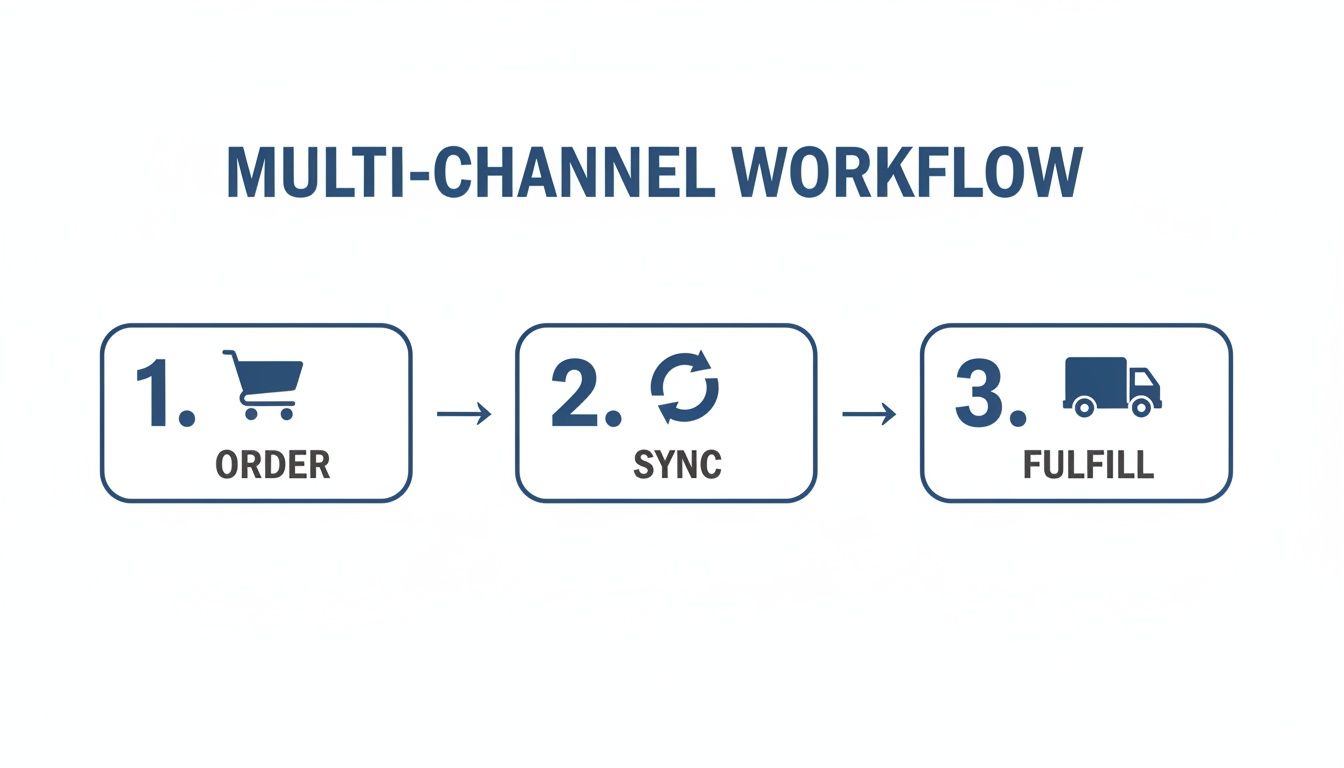
This simple workflow shows exactly how an order moves from the customer's cart, through your integration, and out to your fulfillment partner.
The key thing to notice is that "Sync" sits right in the middle. If that piece breaks, the whole automated process grinds to a halt, and you're stuck doing manual work and fixing errors.
Use what you learn from your eBay best-sellers to inform your strategy back on Shopify. The data might point you toward a winning niche you hadn't even considered. This is precisely where a system like our Apparel Cloning program becomes so powerful. It teaches you how to spot proven designs that are already working and replicate that success across both platforms, creating a feedback loop that fuels continuous growth.
The real magic of an eBay-Shopify integration isn't just selling in two places. It's about using the data from one channel to make smarter, more profitable decisions on the other. This creates a powerful cycle of improvement that consistently boosts your bottom line.
Fueling Growth Across Both Channels
This multi-channel approach has never been more critical. Just look at Shopify's insane growth in 2023, where merchants raked in $9.3 billion during the Black Friday-Cyber Monday weekend alone. That highlights a massive pool of experienced sellers ready to expand their reach, making an eBay Shopify integration the logical next step to tap into eBay's 132 million active users. You can dig into more fascinating figures in these Shopify statistics from Red Stag Fulfillment.
Success in this game is all about relentless improvement. Don't be afraid to experiment. Tweak your eBay listing titles with different keywords, play with your pricing strategies, and take full advantage of eBay's promotional tools like Promoted Listings. Every little adjustment is a chance to learn something new and drive up your revenue. This proactive, data-driven mindset is exactly how you build a thriving and resilient print-on-demand business.
Got Questions About Integrating Shopify and eBay?
Jumping into a multi-channel setup with an eBay Shopify integration is a smart move, but it's totally normal to have a few questions. This is new territory for a lot of entrepreneurs, and a handful of common concerns always seem to pop up. Let's tackle them head-on so you can move forward with confidence.
My goal here is to get you so comfortable and excited about this process that you can pour all that energy back into what you do best—making awesome products and growing your business.
How Do I Handle Returns and Customer Service?
This is a big one. The idea of managing customer support across two completely different platforms can feel like a headache waiting to happen, but it's simpler than you think. The golden rule is to handle all customer interactions on the platform where the sale actually happened.
For an eBay Sale: If a customer buys from you on eBay, you'll manage their messages, questions, and any returns right there in your eBay seller dashboard. This keeps everything clean and, more importantly, compliant with eBay's specific policies.
For a Shopify Sale: Likewise, any orders from your own Shopify store are handled through your normal Shopify workflow. No changes there.
Your integration app is built to sync order and product data, but the actual customer relationship stays platform-specific. This separation actually makes things way easier by creating clear boundaries and preventing any mix-ups. Just make sure your eBay return policies are clearly defined from day one so buyers know exactly what to expect.
Your integration app is for syncing product and order data, not customer conversations. Keep customer service separate for each platform to maintain clarity and give your buyers the best experience.
Is This Going to Be Too Expensive or Complicated?
It's easy to look at a new system and immediately see dollar signs and complexity, but modern integration apps are built for regular people, not developers. You absolutely do not need to be a tech wizard to make this work. Many of the best apps, like Shopify Marketplace Connect, have free starting plans that let you list and sell up to 50 products a month without spending a dime.
This kind of setup is perfect for print-on-demand sellers. It lets you test the waters, see which of your designs resonate on the massive eBay marketplace, and start bringing in revenue before you ever commit to a monthly subscription. The cost scales with your success, which is exactly the kind of deal you want when you're growing a business from the ground up.
Will My Branding Get Lost on eBay?
I get this question a lot. While eBay is a huge marketplace, you still have a surprising amount of control over your brand's presentation. It all comes back to the quality of your listings. This is where your product designs and mockups have to do the heavy lifting.
Creating unique, high-quality designs that stop the scroll is your secret weapon. Tools like AvatarIQ are fantastic for this, letting you generate professional, AI-powered designs and place them on hyper-realistic mockups. Think about it: when a buyer sees a t-shirt on a professional-looking model instead of a flat, generic template, it instantly builds trust and makes your brand feel more legitimate.
By investing in excellent presentation, you ensure that even within eBay's framework, your brand's quality and personality shine through. That's what earns the click and, ultimately, the sale. The opportunity to reach millions of new customers makes this a powerful and exciting next step for any print-on-demand entrepreneur.
At Skup, we're here to help you build a profitable, sustainable eCommerce business. Our programs are built on real-world experience, not theory. Learn more at https://skup.net.
It is 10:30 p.m. Orders are still coming in, customer emails are stacking up, and tomorrow’s ad reports will be waiting in the morning. A manual business turns every sale into more tasks. An automated business turns each sale into a system event that triggers fulfillment, follow-up, reporting, and support with far less owner involvement.…
When you’re just starting out in ecommerce, “supply chain management” sounds like some complicated corporate term meant for massive companies. But let's ditch that idea. It's not just about moving boxes; it's the entire journey your product takes from a design idea to the moment a customer excitedly unboxes their order. It's one of the…
Does it feel like Etsy’s shipping costs are some kind of impossible puzzle designed to chew up your profits? Trust me, you’re not alone. So many sellers get stuck here, but mastering your etsy shipping costs is a game you can absolutely win. This guide is the complete playbook, built by founders who run 8-figure…